前置概念
同步(Synchronous)和异步(Asynchronous)
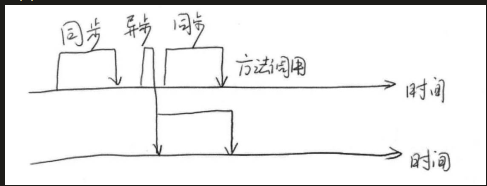
同步和异步通常来形容一次方法调用:
同步方法调用一旦开始,调用者必须等到方法调用返回后,才能继续后续的行为。
异步方法调用更像一个消息传递,一旦开始,方法调用就会立即返回,调用者就可以继续后续的操作。而异步方法通常会在另外一个线程中“真实”地执行。整个过程,不会阻碍调用者的工作。
并发(Concurrency)和并行(Parallelism)
表示两个或者多个任务一起执行,但是侧重点有所不同。
并发偏重于多个任务交替执行,而多个任务之间有可能还是串行的;
并行是真正意义上的“同时执行”。
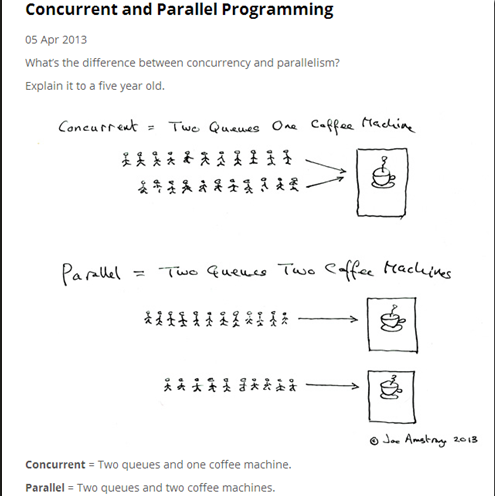
并行的多任务是真的同时执行,而对于并发来说,这个过程只是交替的,一会执行任务A,一会执行任务B,系统会不停地在两者之间切换。但对于外部观察者来说,即使多个任务之间是串行并发的,也会造成多任务间并行执行的错觉。
并发说的是在一个时间段内,多件事情在这个时间段内交替执行。
并行说的是多件事情在同一个时刻同事发生。
当系统只有一个CPU时,不管是多进程还是多线程都不可能实现并行,一个CPU一次执行一条命令,这种情况是通过并发实现的,并行只能在多个CPU系统实现。
临界区
临界区用来表示一种公共资源或者说共享数据,可以被多个线程使用,但是每一次只能有一个线程使用它,一旦临界区资源被占用,其他线程要想使用这个资源就必须等待,如打印机,两个人都想使用打印机只能一个一个使用。
在并行程序中,临界区资源是保护的对象,如果意外出现打印机同时执行两个任务的情况,那么最有可能的结果就是打印出来的文件是损坏的文件,它既不是小王想要的,也不是小明想要的。
阻塞(Blocking)和非阻塞(Non-Blocking)
阻塞和非阻塞通常用来形容很多线程间的相互影响。比如一个线程占用了临界区资源,那么其他所有需要这个资源的线程就必须在这个临界区中等待。等待会导致线程挂起,这种情况就是阻塞。此时,如果占用资源的线程一直不愿意释放资源,那么其他线程阻塞在这个临界区上的线程都不能工作(临界区被占用,其他想要使用的线程被挂机的状态叫阻塞)。
非阻塞的意思与之相反,它强调没有一个线程可以妨碍其他线程执行,所有的线程都会尝试不断向前执行。
死锁(Deadlock)、饥饿(Starvation)、活锁(Livelock)
死锁、饥饿和活锁都属于多线程的活跃性问题。如果发现上述几种情况,那么相关线程就不再活跃,也就是说它可能很难再继续往下执行了。
死锁
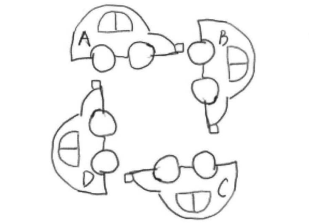
A、B、C、D四辆小车都在这种情况下都无法继续行驶了。他们彼此之间相互占用了其他车辆的车道,如果大家都不愿意释放自己的车道,那么这个状况将永远持续下去,谁都不可能通过,死锁是一个很严重的并且应该避免的问题。
自我理解:即多个线程都各自占用了其他线程想要获取的资源,且所有线程未执行结束都不会释放已占用资源导致互相阻塞。
/**
 * 死锁
 */
public class DeadlockDemo {
    public static void main(String[] args) {
        Obj1 obj1 = new Obj1();
        Obj2 obj2 = new Obj2();
        Thread thread = new Thread(new SynAddRunable(obj1, obj2, 1, 2, true));
        thread.setName("thread1");
        thread.start();
        Thread thread2 = new Thread(new SynAddRunable(obj1, obj2, 2, 1, false));
        thread2.setName("thread2");
        thread2.start();

    }

    public static class SynAddRunable implements Runnable {
        Obj1 obj1;
        Obj2 obj2;
        int a, b;
        boolean flag;

        public SynAddRunable(Obj1 obj1, Obj2 obj2, int a, int b, boolean flag) {
            this.obj1 = obj1;
            this.obj2 = obj2;
            this.a = a;
            this.b = b;
            this.flag = flag;
        }

        @Override
        public void run() {

            try {
                if (flag){
                    synchronized (obj1){
                        Thread.sleep(100);
                        synchronized (obj2){
                            System.out.println(a + b);
                        }
                    }
                }else {
                    synchronized (obj2){
                        Thread.sleep(100);
                        synchronized (obj1){
                            System.out.println(a + b);
                        }
                    }
                }
            } catch (InterruptedException e) {
                throw new RuntimeException(e);
            }
        }
    }

    public static class Obj1 {
    }
    public static class Obj2 {
    }
}
饥饿
指某一个或者多个线程因为种种原因无法获得所要的资源,导致一直无法执行。
比如它的优先级可能太低,而高优先级的线程不断抢占它需要的资源,导致低优先级线程无法工作。或某一个线程一直占着关键资源不放,导致其他需要这个资源的线程无法正常执行,这种情况也是饥饿的一种。与死锁相比,饥饿还是有可能在未来一段时间内解决的(比如,高优先级的线程已经完成任务)。
/**
 * 饥饿死锁
 */
public class HungerDemo {

    //无界的单线程线程池,当线程异常结束会创建新线程
    private static ExecutorService single = Executors.newSingleThreadExecutor();

    public static class AnotherCallable implements Callable<String> {
        @Override
        public String call() throws Exception {
            System.out.println("in AnotherCallable");
            return "annother success";
        }
    }

    public static class MyCallable implements Callable<String> {
        @Override
        public String call() throws Exception {
            System.out.println("in MyCallable");
            Future<String> submit = single.submit(new AnotherCallable());
            return "success:" + submit.get();
        }
    }

    public static void main(String[] args) throws ExecutionException, InterruptedException {
        MyCallable task = new MyCallable();
        Future<String> submit = single.submit(task);
        System.out.println(submit.get());
        System.out.println("over");
        single.shutdown();
    }
}
活锁
需要使用同一个临界区的多个线程主动将资源释放给对方使用,导致资源在两个线程间互相转换,但任何一个线程都没有成功执行。
示例:两个人都要用打印机,互相谦让导致最后没有人实际完成打印操作。
并发级别
由于临界区资源的存在,多线程之间的并发必须收到控制。根据并发的策略,将并发级别分为阻塞、无饥饿、无障碍、无锁、无等待几种。
阻塞
一个线程是阻塞的,那么在其他线程释放资源之前,当前线程无法继续执行。放我们使用synchronized关键字或重入锁时,就会导致其他线程的阻塞。synchronize关键字和重入锁都试图在执行后续代码前,得到临界区的锁,如果得不到,线程就会被挂起等待,直到占有了所需资源为止。
无饥饿(Starvation-Free)
系统设计保证所有线程最终都能获得所需资源,避免某个线程因优先级低或调度策略而长期等待。
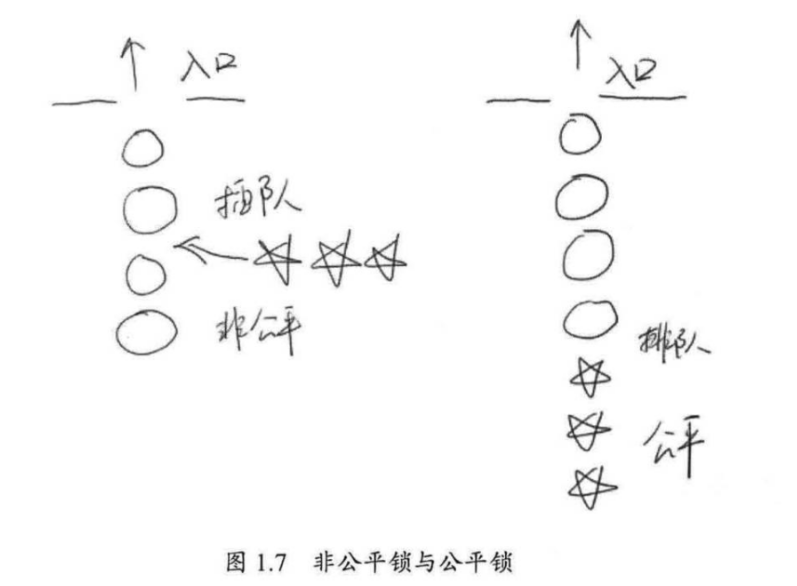
如果线程之间是有优先级的,那么线程调度的时候总是会倾向于先满足高优先级的线程。对于同一个资源的分配,如果是非公平锁的情况,资源有限分配给高优先级的线程,对低优先级线程造成了饥饿;如果锁是公平锁,那么饥饿就不会产生,不论新县城的优先级高低,都要排队等待资源。
无障碍(Obstruction-Free)
线程在无竞争时(即某个时间点后单独运行)能在有限步内完成操作,但在竞争时可能需要重试。最弱的非阻塞保证。
两个线程如果无障碍地执行,那么不会因为临界区的问题导致一方被挂起。换言之,大家都可以大摇大摆地进入临界区了。那么大家一起修改共享数据,把数据改坏了怎么办呢?对于无障碍的线程来说,一旦检测到这种情况,它就会立即对自己所做的修改进行回滚,确保数据安全。但如果没有数据竞争发生,那么线程就可以顺利完成自己的工作,走出临界区。
如果说阻塞的控制方式是悲观策略,也就是说,系统认为两个线程之间很有可能发生不幸的冲突,因此以保护共享数据为第一优先级,相对来说,非阻塞的调度就是一种乐观的策略。它认为多个线程之间很有可能不会发生冲突,或者说这种概率不大。因此大家都应该无障碍地执行,但是一旦检测到冲突,就应该进行回滚。
从这个策略中也可以看到,无障碍的多线程程序并不一定能顺畅运行。因为当临界区中存在严重的冲突时,所有的线程可能都会不断地回滚自己的操作,而没有一个线程可以走出临界区。这种情况会影响系统的正常执行。所以,我们可能会非常希望在这一堆线程中,至少可以有一个线程能够在有限的时间内完成自己的操作,而退出临界区。至少这样可以保证系统不会在临界区中进行无限的等待。
一种可行的无障碍实现可以依赖一个”一致性标记”来实现。线程在操作之前,先读取并保存这个标记,在操作完成后,再次读取,检查这个标记是否被更改过,如果两者是一致的,则说明资源访问没有冲突。如果不一致,则说明资源可能在操作过程中与其他线程冲突,需要重试操作。而任何对资源有修改操作的线程,在修改数据前,都需要更新这个一致性标记,表示数据不再安全。
无锁(Lock-Free)
系统整体保证至少有一个线程能取得进展(即使其他线程失败或重试)。无锁 ≠ 不用锁,而是通过原子操作(如CAS)实现。
在无锁的情况下,所有的线程都能尝试对临界区进行访问,但不同的是,无锁的并发保证必然有一个线程能够在有限步内完成操作离开临界区。在无锁的调用中,一个典型的特点是可能会包含一个无穷循环。在这个循环中,线程会不断尝试修改共享变量。如果没有冲突,修改成功,那么程序退出,否则继续尝试修改。但无论如何,无锁的并行总能保证有一个线程是可以胜出的,不至于全军覆没。至于临界区中竞争失败的线程,他们必须不断重试,直到自己获胜。如果运气很不好,总是尝试不成功,则会出现类似饥饿的现象,线程会停止。
无等待(Wait-Free)
每个线程的操作都能在有限步数内完成,无需等待其他线程。最强的非阻塞保证。
无等待则在无锁的基础上更进一步扩展。它要求所有线程都必须在有限步内完成,这样不会引起饥饿问题。如果限制这个步骤的上限,还可以进一步分解为有界无等待和线程数无关的无等待等几种,他们之间的区别只是对循环次数的限制不同。
进程和线程
进程(Process)
定义:
进程是操作系统进行资源分配和调度的基本单位,表示一个正在执行的程序实例。每个进程拥有独立的地址空间和系统资源。
核心特性:
独立性:进程之间内存隔离,互不干扰。
资源开销大:创建、切换或终止进程需要较高的系统开销(如内存复制)。
通信复杂:进程间通信(IPC)需通过管道、共享内存、消息队列或套接字等机制。
可靠性高:一个进程崩溃通常不会直接影响其他进程。
生命周期状态:
新建(New):进程被创建。
就绪(Ready):等待CPU分配时间片。
运行(Running):正在执行。
阻塞(Blocked):等待I/O等资源。
终止(Terminated):执行完毕或被终止。
线程(Thread)
定义:
线程是 进程内的执行单元,共享进程的资源(如内存、文件句柄),是CPU调度的基本单位。
核心特性:
共享资源:同一进程的线程共享堆、全局变量等,但各自拥有独立的栈和寄存器。
轻量级:创建、切换线程的开销远小于进程。
通信便捷:线程间可直接通过共享内存通信,但需同步(如锁、信号量)。
风险较高:一个线程崩溃可能导致整个进程终止。
生命周期状态:
New:表示刚刚创建的线程,这种线程还没有开始执行;
RUNNABLE:运行状态,线程的start()方法调用后,线程会处于这种状态;
BLOCKED:阻塞状态。当线程在执行的过程中遇到了synchronized同步块,但这个同步块被其他线程已获取还未释放时,当前线程将进入阻塞状态,会暂停执行,直到获取到锁。当线程获取到锁之后,又会进入到运行状态(RUNNABLE);
WAITING:等待状态。和TIME_WAITING都表示等待状态,区别是WAITING会进入一个无时间限制的等,而TIME_WAITING会进入一个有限的时间等待,那么等待的线程究竟在等什么呢?一般来说,WAITING的线程正式在等待一些特殊的事件,比如,通过wait()方法等待的线程在等待notify()方法,而通过join()方法等待的线程则会等待目标线程的终止。一旦等到期望的事件,线程就会再次进入RUNNABLE运行状态;
TERMINATED:表示结束状态,线程执行完毕之后进入结束状态。
注意:从NEW状态出发后,线程不能在回到NEW状态,同理,处理TERMINATED状态的线程也不能在回到RUNNABLE状态。
线程的基本操作
创建线程
- 继承Thread类实现:
- 重写run方法
- 调用start方法执行线程;
- 实现Runnable接口实现多线程:
- 重写run方法
- 在Thread构造方法放入实现类的对象
- 调用satrt方法;
- 实现Callable接口及FutureTask实现可返回结果的多线程
- 实现Callable接口,重写call方法;
- 初始化FutureTask对象装在Callable实现类对象;
- 初始化Thread装载FutureTask对象,调用start方法执行;
- FutureTask对象的get方法获取返回值。
终止线程、线程中断
public final void stop();//终止线程

public void interrupt() //中断线程
public boolean isInterrupted() //判断线程是否被中断
public static boolean interrupted()  //判断线程是否被中断,并清除当前中断状态
等待(wait)和通知(notify)
为了支持多线程之间的协作,JDK提供了两个非常重要的方法:等待wait()方法和通知notify()方法。这2个方法并不是在Thread类中的,而是在Object类中定义的。这意味着所有的对象都可以调用者两个方法。
wait方法必须在 synchronized 代码块或同步方法中调用,否则抛出 IllegalMonitorStateException。
public final void wait() throws InterruptedException;
public final native void notify();当在一个对象实例上调用wait()方法后,当前线程就会在这个对象上等待。如在线程A中,调用了obj.wait()方法,那么线程A就会停止继续执行,转为等待状态。等待到其他线程调用obj.notify()方法为止。
如果一个线程调用了object.wait()方法,那么它就会进出object对象的等待队列。这个队列中,可能会有多个线程,因为系统可能运行多个线程同时等待某一个对象。当object.notify()方法被调用时,它就会从这个队列中随机选择一个线程,并将其唤醒。这个选择是不公平的,并不是先等待线程就会优先被选择,这个选择完全是随机的。
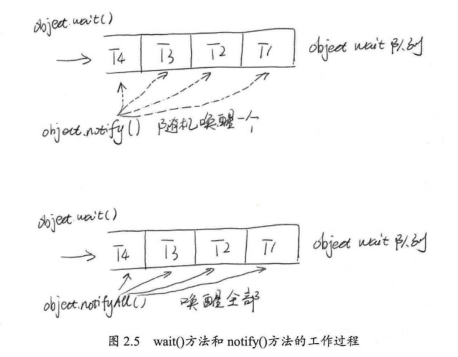
除notify()方法外,Object独享还有一个nofiyAll()方法,它会唤醒在这个等待队列中所有等待的线程。
**Object.wait()**方法和**Thread.sleep()**方法都可以让现场等待若干时间。除**wait()**方法可以被唤醒外,另外一个主要的区别就是**wait()**方法会释放目标对象的锁,而**Thread.sleep()**方法不会释放锁。
挂起(suspend)和继续执行(resume)线程
Thread类中还有2个方法,即线程挂起(suspend)和继续执行(resume),这2个操作是一对相反的操作,被挂起的线程,必须要等到resume()方法操作后,才能继续执行。系统中已经标注着2个方法过时了,不推荐使用。
等待线程结束(join)和谦让(yeild)
一个线程的输入可能非常依赖于另外一个或者多个线程的输出,此时,这个线程就需要等待依赖的线程执行完毕,才能继续执行。jdk提供了join()操作来实现这个功能。
//无限等待,直到目标线程执行完毕。
public final void join() throws InterruptedException;
//指定等待时间,如果超过了给定的时间目标线程还在执行,当前线程也会停止等待,而继续往下执行。
public final synchronized void join(long millis) throws InterruptedException;
/**
* 等待线程结束 join
*/
public class ThreadJoinDemo {
static int num = 0;
public static void main(String[] args) throws InterruptedException {
ThreadJoinChild t1 = new ThreadJoinChild("t1");
t1.start();
t1.join();
System.out.println("num="+num);
}
public static class ThreadJoinChild extends Thread {
public ThreadJoinChild(String name) {
super(name);
}
@Override
public void run() {
System.out.println("子线程开始执行-"+System.currentTimeMillis()+"-"+this.getName());
for (int i = 0; i < 10; i++) {
num++;
try {
Thread.sleep(1000);
} catch (InterruptedException e) {
e.printStackTrace();
}
}
System.out.println("子线程执行完毕-"+System.currentTimeMillis()+"-"+this.getName());
}
}
}从`join`的代码中可以看出,在被等待的线程上使用了`synchronize`,调用了它的`wait()`方法,线程最后执行完毕之后,系统会自动调用它的notifyAll()方法,唤醒所有在此线程上等待的其他线程。
注意:被等待的线程执行完毕之后,系统自动会调用该线程的notifyAll()方法。所以一般情况下,我们不要去在线程对象上使用wait()、notify()、notifyAll()方法。
public static native void yield();yield是谦让的意思,这是一个静态方法,一旦执行,它会让当前线程出让CPU,但需要注意的是,出让CPU并不是说不让当前线程执行了,当前线程在出让CPU后,还会进行CPU资源的争夺,但是能否再抢到CPU的执行权就不一定了。
volatile与JMM
public class Demo09 {
    public static boolean flag = true;
    public static class T1 extends Thread {
        public T1(String name) {
            super(name);
        }
        @Override
        public void run() {
            System.out.println("线程" + this.getName() + " in");
            while (flag) {
                ;
            }
            System.out.println("线程" + this.getName() + "停止了");
        }
    }
    public static void main(String[] args) throws InterruptedException {
        new T1("t1").start();
        //休眠1秒
        Thread.sleep(1000);
        //将flag置为false
        flag = false;
    }
}
上述代码执行后,程序无法结束,主线程中对flag的修改对于“t1”线程不可见。
JVM中,Java线程之间的通信由Java内存模型(本文简称为JMM)控制,JMM决定一个线程对共享变量的写入何时对另一个线程可见。从抽象的角度来看,JMM定义了线程和主内存之间的抽象关系:线程之间的共享变量存储在主内存(main memory)中,每个线程都有一个私有的本地内存(local memory),本地内存中存储了该线程以读/写共享变量的副本。本地内存是JMM的一个抽象概念,并不真实存在。它涵盖了缓存,写缓冲区,寄存器以及其他的硬件和编译器优化。Java内存模型的抽象示意图如下:
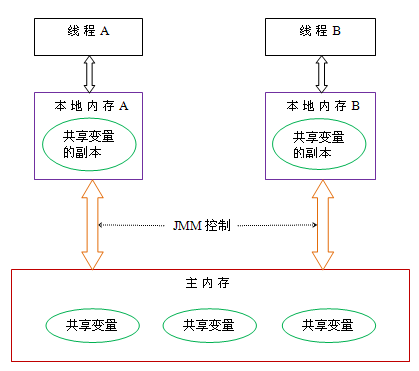
从上图中可以看出,线程A需要和线程B通信,必须要经历下面2个步骤:
- 首先,线程A把本地内存A中更新过的共享变量刷新到主内存中去;
- 然后,线程B到主内存中去读取线程A之前已更新过的共享变量;
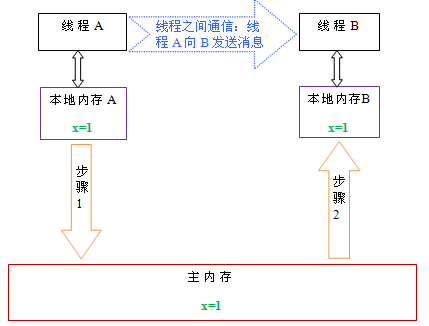
实现方式:线程中修改了工作内存中的副本之后,立即将其刷新到主内存;工作内存中每次读取共享变量时,都去主内存中重新读取,然后拷贝到工作内存。
java帮我们提供了这样的方法,使用volatile修饰共享变量,就可以达到上面的效果,被volatile修改的变量有以下特点:
- 线程中读取的时候,每次读取都会去主内存中读取共享变量最新的值,然后将其复制到工作内存
- 线程中修改了工作内存中变量的副本,修改之后会立即刷新到主内存。
public class VolatileDemo {
    //新增变量flag为volatile类型可自动停止,否则线程t1不会停止
    public static volatile boolean flag = true;
    public static class T1 extends Thread {
        public T1(String name) {
            super(name);
        }
        @Override
        public void run() {
            System.out.println("线程" + this.getName() + " in");
            while (flag) {
                ;
            }
            System.out.println("线程" + this.getName() + "停止了");
        }
    }
    public static void main(String[] args) throws InterruptedException {
        new T1("t1").start();
        //休眠1秒
        Thread.sleep(1000);
        //将flag置为false
        flag = false;
    }
}
线程组
为了方便管理,可以将线程归属到某个线程组,线程组可以包含多个线程及线程组,线程和线程组组成了父子关系。
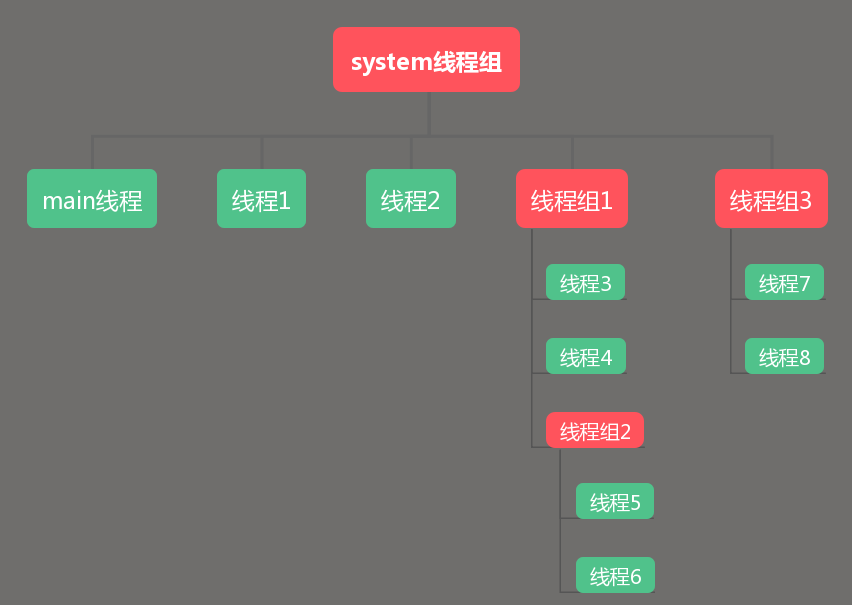
创建线程关联线程组
/**
 * 添加线程组
 */
public class ThreadGroupDemo {
    public static void main(String[] args) throws InterruptedException {
        ThreadGroup tg1 = new ThreadGroup("tg1");
        new Thread(tg1, new T1(), "t1").start();
        new Thread(tg1, new T1(), "t2").start();
        TimeUnit.SECONDS.sleep(1);
        System.out.println("活动的线程数:" + tg1.activeCount());
        System.out.println("活动的线程组:" + tg1.activeGroupCount());
        System.out.println("活动的线程组名:" + tg1.getName());
    }

    public static class T1 implements Runnable {

        @Override
        public void run() {
            System.out.println("线程" + Thread.currentThread().getName() + " in");
            try {
                TimeUnit.SECONDS.sleep(3);
            } catch (InterruptedException e) {
                e.printStackTrace();
            }
        }
    }
}
为线程组指定付线程组
创建线程组的时候,可以给其指定一个父线程组,也可以不指定,如果不指定父线程组,则父线程组为当前线程的线程组,java api有2个常用的构造方法用来创建线程组:
public ThreadGroup(String name)
public ThreadGroup(ThreadGroup parent, String name)
/**
* 给线程创建付线程组
*/
public class ThreadGroupParentDemo {
public static class P1 implements Runnable {
@Override
public void run() {
Thread thread = Thread.currentThread();
System.out.println("所属线程组:"+thread.getThreadGroup().getName()+",线程名:"+thread.getName());
try {
TimeUnit.SECONDS.sleep(3);
} catch (InterruptedException e) {
e.printStackTrace();
}
}
}
public static void main(String[] args) throws InterruptedException{
ThreadGroup threadGroup = new ThreadGroup("thread-group-1");
new Thread(threadGroup, new P1(), "t1").start();
new Thread(threadGroup, new P1(), "t2").start();
TimeUnit.SECONDS.sleep(1);
System.out.println("活动的线程数:" + threadGroup.activeCount());
System.out.println("活动的线程组:" + threadGroup.activeGroupCount());
System.out.println("活动的线程组名:" + threadGroup.getName());
System.out.println("活动的线程组名称:"+threadGroup.getParent().getName());
System.out.println("------------");
ThreadGroup threadGroup2 = new ThreadGroup(threadGroup,"thread-group-2");
new Thread(threadGroup2, new P1(), "t1").start();
new Thread(threadGroup2, new P1(), "t2").start();
TimeUnit.SECONDS.sleep(1);
System.out.println("2活动的线程数:" + threadGroup2.activeCount());
System.out.println("2活动的线程组:" + threadGroup2.activeGroupCount());
System.out.println("2活动的线程组名:" + threadGroup2.getName());
System.out.println("2活动的线程组名称:"+threadGroup2.getParent().getName());
System.out.println("------------");
System.out.println("----------------------");
System.out.println("threadGroup1活动线程数:" + threadGroup.activeCount());
System.out.println("threadGroup1活动线程组:" + threadGroup.activeGroupCount());
System.out.println("----------------------");
threadGroup.list();
}
}批量停止线程
调用线程组interrupt(),会将线程组树下的所有子孙线程中断标志置为true,可以用来批量中断线程。
/**
 * 批量停止线程
 */
public class ThreadInterruptDemo {
    public static class I1 extends Thread {
        public void run() {
            Thread thread = Thread.currentThread();
            System.out.println("线程组:"+thread.getThreadGroup().getName()+",线程名:"+thread.getName());
            while (!thread.isInterrupted()) {
                ;
            }
            System.out.println("线程结束"+thread.getName());
        }
    }

    public static void main(String[] args) throws InterruptedException {
        ThreadGroup tg = new ThreadGroup("tg");
        new Thread(tg, new I1(), "t1").start();
        new Thread(tg, new I1(), "t2").start();

        ThreadGroup tg2 = new ThreadGroup(tg, "tg2");
        new Thread(tg2, new I1(), "t3").start();
        new Thread(tg2, new I1(), "t4").start();
        TimeUnit.SECONDS.sleep(1);

        System.out.println("-------tg信息--------");
        tg.list();

        System.out.println("---------------------");
        System.out.println("停止线程组"+tg.getName()+"下的所有线程");
        tg.interrupt();
        TimeUnit.SECONDS.sleep(2);

        System.out.println("-------tg1停止后信息--------");
        tg.list();
    }
}
守护线程和用户线程
守护线程:
定义:程序执行时后台完成一些系统性服务,如垃圾回收、日志监控都是守护线程,不参与核心业务。
特点:当所有用户线程结束时,无论守护线程是否执行完毕,JVM都会强制终止它们。守护线程的生命周期依赖于用户线程的存在。
使用:new Thread{ }.start();
/**
 * 守护线程,当用户线程执行结束后,守护线程无论是否结束,JVM都退出
 */
public class DaemonThreadDemo {
    public static void main(String[] args) {
        //用户线程
        Thread thread1 = new Thread(() -> {
            try {
                TimeUnit.SECONDS.sleep(5);
            } catch (InterruptedException e) {
                throw new RuntimeException(e);
            }
        }, "user thread");
        thread1.start();
        //守护线程
        Thread thread = new Thread(() -> {
            while (true) {
                System.out.println("daemon thread");
            }
        }, "daemon thread");
        thread.setDaemon(true);
        thread.start();
        System.out.println("main");
    }
}用户线程:
定义:用户线程是程序中的主要工作线程,用于执行具体的业务逻辑(如数据处理、界面操作等)。
特点:要存在一个用户线程未结束,JVM就不会退出。用户线程需要显式地执行完毕或被中断才能终止。
使用:new Thread{}.setDaemon(true) .start(); 必须在调用start前调用setDaemon(true);方法。
/**
 * 用户线程不结束,JVM不退出
 * */
public class UserThreadDemo {
    public static void main(String[] args) throws InterruptedException {
        Thread t1 = new Thread(() -> {
            while (true) {
            }
        });
        t1.start();
        System.out.println("main");
    }
}
线程安全和synchronized
线程安全
定义:多线程环境下,当一个类、方法或对象被多个线程同时访问时,无论线程如何交替执行,其行为始终能保持正确性、一致性和可判定性(即与预想的结果一致)。
特性:
- 原子性:锁机制确保临界区代码执行过程中不被中断,例如
count++操作从读取到写入的完整性; - 可见性:锁释放前强制将变量刷新到内存,其他线程可获取最新值;
- 有序性:通过”互斥串行化“防止执行重排序,保证代码执行顺序符合预期。
/**
 * 演示线程安全的问题
 */
public class ThreadSafetyDemo1 {
    static int num = 0;

    public static void m1(int n) {
        for (int i = 0; i < n; i++) {
            num++;
        }
    }

    public static void main(String[] args) throws InterruptedException {
        Thread thread = new Thread(() -> {
            m1(10000);
        });

        Thread thread1 = new Thread(() -> {
            m1(10000);
        });

        Thread thread2 = new Thread(() -> {
            m1(10000);
        });


        thread.start();
        thread1.start();
        thread2.start();

        thread.join();
        thread1.join();
        thread2.join();

        System.out.println(num);
        // 结果是23484
    }
}
上述代码中,期望结果是30000,实际结果与预期结果不一致,以上代码是线程不安全的。
造成线程不安全的原因:
- 存在共享资源(临界区);
- 存在多个线程同时操作共享资源。
解决方案:
要解决多个线程同时操作一个资源且达到预期效果,可以考虑将资源上锁,当一个线程操作完后,其他线程才可操作这个资源。**synchronized**关键字可以实现为在同一时刻,只有一个线程可以执行某个方法或代码块操作临界区资源。且**synchronized**还可以实现线程间副本资源的修改被其他线程看到。
public static synchronized void  m1(int n) {
    for (int i = 0; i < n; i++) {
        num++;
    }
}
synchronized使用方式
- 修饰实例方法,作用于当前实例,进入同步代码前需要先获取实例的锁;
- 修饰静态方法,作用于类的Class对象,进入修饰的静态方法前需要先获取类的Class对象的锁;
- 修饰代码块,需要指定加锁对象(记做lockobj),在进入同步代码块前需要先获取lockobj的锁;
synchronized作用于实例方法
- 锁对象:当前实例(
this) - 特点:同一个实例的多个线程会互斥访问该方法,不同实例的对象无影响。
/**
 * synchronized修饰实例方法
 */
public class SynchronizedDemo1 {
    int num = 0;

    public static void main(String[] args) throws InterruptedException {
        SynchronizedDemo1 demo1 = new SynchronizedDemo1();
        Thread thread = new Thread(() -> {
            demo1.m1();
        });
        thread.start();
        Thread thread1 = new Thread(() -> {
            demo1.m1();
        });
        thread1.start();

        thread.join();
        thread1.join();

        System.out.println(demo1.num);
    }

    public synchronized void m1() {
        num++;
    }
}
synchronized作用于静态方法
- 锁对象:类的class对象;
- 所有实例调用该方法时均竞争同一个锁,适用于全局资源保护。
/**
 * synchronized修饰静态方法
 */
public class SynchronizedDemo2 {
    static int num = 0;

    public static synchronized void m1() {
        for (int i = 0; i < 10000; i++) {
            num++;
        }
    }

    public static class T2 extends Thread {
        @Override
        public void run() {
            SynchronizedDemo2.m1();
        }
    }

    public static void main(String[] args) throws InterruptedException {
        Thread t1 = new T2();
        Thread t2 = new T2();
        Thread t3 = new T2();
        t1.start();
        t2.start();
        t3.start();

        t1.join();
        t2.join();
        t3.join();

        System.out.println(num);
    }
}
synchronized同步代码块
- 锁对象:手动指定任务对象;
- 特点:仅锁定关键字代码段,减少同步范围。
/**
 * synchronized修饰同步代码块
 */
public class SynchronizedDemo3 implements Runnable{
    static SynchronizedDemo3 synchronizedDemo3 = new SynchronizedDemo3();
    static int count = 0;


    @Override
    public void run() {
        //其他耗时操作
        synchronized (synchronizedDemo3){
            for (int i = 0; i < 10000; i++) {
                count++;
            }
        }
    }

    public static void main(String[] args) throws InterruptedException {
        Thread t1 = new Thread(synchronizedDemo3);
        Thread t2 = new Thread(synchronizedDemo3);
        Thread t3 = new Thread(synchronizedDemo3);
        t1.start();
        t2.start();
        t3.start();

        t1.join();
        t2.join();
        t3.join();

        System.out.println(count);
    }
}
线程中断方式
通过变量控制
/**
 * 线程中断方式: 变量控制
 */
public class ThreadStopDemo {
    public static volatile boolean flag = false;
    public static void main(String[] args) throws InterruptedException {
        Thread t1 = new Thread(() -> {
            while (true) {
                System.out.println("线程运行中");
                if (flag){
                    try {
                        TimeUnit.SECONDS.sleep(1);
                    } catch (InterruptedException e) {
                        throw new RuntimeException(e);
                    }
                    System.out.println("线程中断");
                    break;
                }
            }
        });

        t1.start();

        TimeUnit.SECONDS.sleep(3);
        flag = true;
    }
}
通过线程自带的中断标志控制
线程内部有个中断标志,当调用线程的interrupt()实例方法之后,线程的中断标志会被置为true,可以通过线程的实例方法isInterrupted()获取线程的中断标志。
/**
 * 线程自带的中断标志
 */
public class ThreadStopDemo2 {
    public static class T extends Thread {
        public void run() {
            while (true) {
                if (this.isInterrupted()) {
                    System.out.println("线程中断");
                    break;
                }
                System.out.println("线程运行中");
            }
        }
    }

    public static void main(String[] args) throws InterruptedException {
        T t = new T();
        t.start();
        Thread.sleep(1000);
        t.interrupt();
    }
}
线程阻塞状态中中断
- 调用线程的
interrupt()实例方法,线程的中断标志会被置为true - 当线程处于阻塞状态时,调用线程的
interrupt()实例方法,线程内部会触发InterruptedException异常,并且会清除线程内部的中断标志(即将中断标志置为false)。
/**
 * 线程阻塞状态中中断
 */
public class ThreadStopDemo3 {
    public static class T extends Thread {
        @Override
        public void run() {
            while (true) {
                //循环处理业务
                //下面模拟阻塞代码
                try {
                    TimeUnit.SECONDS.sleep(1000);
                } catch (InterruptedException e) {
                    e.printStackTrace();
                    this.interrupt();
                }
                if (this.isInterrupted()) {
                    break;
                }
            }
        }
    }
    public static void main(String[] args) throws InterruptedException {
        T t = new T();
        t.start();
        TimeUnit.SECONDS.sleep(3);
        t.interrupt();
    }
}
JUC常见类
juc是java1.5开始引入的java.util.concurrent包的简称,是java支持高并发变成的核心工具包,为简化多线程开发、提高程序效率并解决竞争条件及死锁等并发问题。
ReentrantLock
synchronized的局限性
synchronized是java内置的关键字,它的获取和释放由jvm实现,拥有一定的局限性:
- 当线程尝试获取锁的时候,如果获取不到回一直阻塞,这个阻塞的过程用户无法控制;
- 如果已经获取锁的线程进入休眠或阻塞状态,除非线程异常,否则其他线程尝试获取该线程已有锁需要一直等待。
ReentrantLock
Lock锁是JUC包中拓展的加锁功能,弥补了synchronized的局限,提供了更加细粒度的加锁功能。ReentrantLock是Lack的默认实现。
补充知识:
- 可重入锁:允许同一线程多次获取同一把锁,避免因递归或嵌套调用导致的死锁问题。线程在持有锁的情况下,可重复进入由该锁保护的同步代码块。
ReentrantLock和synchronized都是可重入锁; - 可中断锁:允许线程在等待锁的过程中响应中断请求,终止等待状态并处理中断异常。
ReentrantLock的lockInterruptibly()方法实现了这一特性,synchronized无法中断。 - 公平锁和非公平锁:
- 公平锁:严格按照线程请求顺序(FIFO)分配锁;上下文频繁切换,吞吐量低。
- 非公平锁:允许新请求的线程“插队”,可能造成饥饿;减少上下文切换,吞吐量高。
synchronized是非公平锁,ReentrantLock两种均可实现。
| 锁类型 | 优势 | 劣势 | 适用场景 |
|---|---|---|---|
| 可重入锁 | 避免死锁,简化嵌套同步代码设计 | 无 | 递归调用、复杂同步逻辑 |
| 可中断锁 | 支持任务取消和超时控制 | 需手动处理中断异常 | 高响应要求的任务(如实时系统) |
| 公平锁 | 保证执行顺序,避免饥饿 | 性能开销大 | 需顺序执行的业务(如日志记录) |
| 非公平锁 | 高吞吐量,减少线程切换 | 可能导致线程长时间等待 | 高并发读写(如缓存、计数器) |
ReentrantLock基本使用
public class ReentrantLockSyncDemo {
    private static int count = 0;

    private static synchronized void add() {
        count++;
    }

    public static class T1 extends Thread {
        @Override
        public void run() {
            for (int i = 0; i < 10000; i++) {
                ReentrantLockSyncDemo.add();
            }
        }
    }

    public static void main(String[] args) throws InterruptedException {
        T1 t1 = new T1();
        T1 t2 = new T1();
        T1 t3 = new T1();

        t1.start();
        t2.start();
        t3.start();

        t1.join();
        t2.join();
        t3.join();

        System.out.println(ReentrantLockSyncDemo.count);
    }
}
public class ReentrantLockDemo {
private static int count = 0;
//创建锁
private static ReentrantLock lock = new ReentrantLock();
private static void add() {
//获取锁
lock.lock();
try {
count++;
} finally {
//释放锁
lock.unlock();
}
}
public static class T1 extends Thread {
@Override
public void run() {
for (int i = 0; i < 10000; i++) {
ReentrantLockDemo.add();
}
}
}
public static void main(String[] args) throws InterruptedException {
T1 t1 = new T1();
T1 t2 = new T1();
T1 t3 = new T1();
t1.start();
t2.start();
t3.start();
t1.join();
t2.join();
t3.join();
System.out.println(ReentrantLockDemo.count);
}
}注意:
- 与
synchronized相比ReentrantLock包含了锁的创建、获取、释放过程,使用灵活; ReentrantLock锁的释放lock.unlock();方法必须放在finally中,否则如果程序异常锁不被释放会导致线程阻塞。
ReentrantLock实现可重入锁
/**
 * ReentrantLock可重入锁
 */
public class ReentrantLockDemo1 {
    private static int count = 0;

    private static ReentrantLock lock = new ReentrantLock();

    private static void add() {
        lock.lock();
        lock.lock();
        try {
            count++;
        } finally {
            lock.unlock();
            lock.unlock();
        }
    }

    public static class T1 extends Thread {
        @Override
        public void run() {
            for (int i = 0; i < 10000; i++) {
                ReentrantLockDemo1.add();
            }
        }
    }

    public static void main(String[] args) throws InterruptedException {
        T1 t1 = new T1();
        T1 t2 = new T1();
        T1 t3 = new T1();

        t1.start();
        t2.start();
        t3.start();

        t1.join();
        t2.join();
        t3.join();

        System.out.println(ReentrantLockDemo1.count);
    }
}
注意:
- 上述代码中
add方法中获取锁执行了两次程序顺利执行。若为不可重入锁,第二次获取锁会因为锁没有释放而死锁; lock()方法和unlock()方法需成对出现,锁了几次也要释放几次,否则后面的线程无法获取锁,unlock方法必须放在finally中。
ReentrantLock实现公平锁
大多数情况锁都是非公平的,多个线程同时获取一个锁时随机获取的,synchronized由jvm实现是非公平的,ReentrantLock可以自定义是否公平锁,默认是非公平的。
public ReentrantLock() {
    sync = new NonfairSync();
}
public ReentrantLock(boolean fair) {
    sync = fair ? new FairSync() : new NonfairSync(); // fair 为true时,创建公平锁
}
/**
* ReentrantLock实现公平锁
*/
public class ReentrantLockDemo2 {
private static ReentrantLock lock = new ReentrantLock(true);
public static class T1 extends Thread {
public T1(String name) {
super(name);
}
@Override
public void run() {
for (int i = 0; i < 5; i++) {
lock.lock();
try {
System.out.println(this.getName() + "获得锁");
} finally {
lock.unlock();
}
}
}
}
public static void main(String[] args) throws InterruptedException {
T1 t1 = new T1("T1");
T1 t2 = new T1("T2");
T1 t3 = new T1("T3");
t1.start();
t2.start();
t3.start();
t1.join();
t2.join();
t3.join();
}
}
//为true时
T1获得锁
T2获得锁
T3获得锁
T1获得锁
T2获得锁
T3获得锁
//为false时
T1获得锁
T1获得锁
T1获得锁
T3获得锁
T2获得锁
T3获得锁ReentrantLock获取锁的过程是可中断的
对于synchronized关键字,一个线程等待获取锁最终要么获取到了要么就是一直等待到其他线程释放锁为止。
ReentrantLock提供了在等待获取锁的过程中(发起获取锁请求到还未获取锁的这段时间中)是可以被中断的。
/**
 * ReentrantLock可中断行
 */
public class ReentrantLockDemo3 {

    private static ReentrantLock lock1 = new ReentrantLock();
    private static ReentrantLock lock2 = new ReentrantLock();

    public static void main(String[] args) throws InterruptedException {
        T1 t1 = new T1("T1", 1);
        T1 t2 = new T1("T2", 2);

        t1.start();
        t2.start();

        TimeUnit.SECONDS.sleep(5);
        //中断线程
        t2.interrupt();

        t1.join();
        t2.join();
    }

    public static class T1 extends Thread {
        int lock;

        public T1(String name, int lock) {
            super(name);
            this.lock = lock;
        }

        @Override
        public void run() {
            try {
                if (this.lock == 1) {
                    //除非当前线程 中断,否则获取锁
                    lock1.lockInterruptibly();
                    TimeUnit.SECONDS.sleep(1);
                    lock2.lockInterruptibly();
                } else {
                    lock2.lockInterruptibly();
                    TimeUnit.SECONDS.sleep(1);
                    lock1.lockInterruptibly();
                }
            } catch (InterruptedException e) {
                System.out.println("中断标记:" + this.isInterrupted());
                e.printStackTrace();
            } finally {
                if (lock1.isHeldByCurrentThread()) {
                    lock1.unlock();
                }
                if (lock2.isHeldByCurrentThread()) {
                    lock2.unlock();
                }
            }
        }
    }
}
t2在41行一直获取不到lock1的锁,主线程中等待了5秒之后,t2线程调用了interrupt()方法,将线程的中断标志置为true,此时41行会触发InterruptedException异常,然后线程t2可以继续向下执行,释放了lock2的锁,然后线程t1可以正常获取锁,程序得以继续进行。线程发送中断信号触发InterruptedException异常之后,中断标志将被清空。
注意:
ReentrankLock中必须使用实例方法lockInterruptibly()获取锁时,在线程调用interrupt()方法之后,才会引发InterruptedException异常;- 线程调用
interrupt()之后,线程的中断标志会被置为true; - 触发
InterruptedException异常之后,线程的中断标志会被清空,即置为false; - 所以当线程调用
interrupt()引发InterruptedException异常,中断标志的变化是:false->true->false。
ReentrantLock锁申请等待限时
一般情况下,获取锁的时间是未知的,synchronized在获取锁的过程中,只能等待其他线程把锁释放之后才有机会获取到锁,所以获取锁的时间又长又短。ReentrantLock中提供了tryLock()方法可以选择传入的时间参数,表示等待指定时间,无参则表示立即返回锁申请的结果:true表示申请成功,false表示申请失败。
/**
 * ReentrantLock申请等待时间(无参方法)
 */
public class ReentrantLockDemo4 {

    private static ReentrantLock lock1 = new ReentrantLock();

    public static void main(String[] args) throws InterruptedException {
        T1 t1 = new T1("T1");
        T1 t2 = new T1("T2");

        t1.start();
        t2.start();

    }

    public static class T1 extends Thread {

        public T1(String name) {
            super(name);
        }

        @Override
        public void run() {
            try {
                System.out.println("线程" + this.getName() + " in");
                //尝试获取锁,不论是否成功,立即返回
                if (lock1.tryLock()){
                    System.out.println("线程" + this.getName() + " 获取到锁");
                    TimeUnit.SECONDS.sleep(5);
                }else {
                    System.out.println("线程" + this.getName() + " 未获取到锁");
                }
            } catch (InterruptedException e) {
                e.printStackTrace();
            }finally {
                if (lock1.isHeldByCurrentThread()){
                    lock1.unlock();
                }
            }
        }
    }
}
//输出结果
线程T2 in
线程T2 获取到锁
线程T1 in
线程T1 未获取到锁
/**
* ReentrantLock申请等待时间(有参方法)
*/
public class ReentrantLockDemo5 {
private static ReentrantLock lock1 = new ReentrantLock();
public static void main(String[] args) throws InterruptedException {
T1 t1 = new T1("T1");
T1 t2 = new T1("T2");
t1.start();
t2.start();
}
public static class T1 extends Thread {
public T1(String name) {
super(name);
}
@Override
public void run() {
try {
System.out.println("线程" + this.getName() + " in");
//尝试获取锁,3秒内是否能否获取锁都会返回
if (lock1.tryLock(3, TimeUnit.SECONDS)){
System.out.println("线程" + this.getName() + " 获取到锁");
TimeUnit.SECONDS.sleep(5);
}else {
System.out.println("线程" + this.getName() + " 未获取到锁");
}
} catch (InterruptedException e) {
e.printStackTrace();
}finally {
if (lock1.isHeldByCurrentThread()){
lock1.unlock();
}
}
}
}
}
//输出结果
线程T1 in
线程T2 in
线程T1 获取到锁
线程T2 未获取到锁注意:
- 有参和无参方法都会返回
boolean值,表示获取锁是否成功; tryLock()方法,不管是否获取成功,都会立即返回;而有参的tryLock方法会尝试在指定的时间内去获取锁,中间会阻塞的现象,在指定的时间之后会不管是否能够获取锁都会返回结果;tryLock()方法不会响应线程的中断方法;而有参的tryLock方法会响应线程的中断方法,而触发InterruptedException异常。
ReentrantLock其他常用的方法
isHeldByCurrentThread实例方法,判断当前线程是否持有ReentrantLock的锁。
获取锁的4种方式
| 获取锁的方式 | 是否立即响应(不会阻塞) | 是否响应中断 |
|---|---|---|
| lock() | × | × |
| lockInterruptibly() | × | √ |
| tryLock() | √ | × |
| tryLock(long timeout, TimeUnit unit) | × | √ |
Condition
synchronized中等待和唤醒线程示例
/**
 * synchronized中的等待和唤醒
 */
public class SynchronizedWaitNotifyDemo {
    static Object obj = new Object();

    public static class T extends Thread {
        @Override
        public void run() {
            System.out.println(System.currentTimeMillis()+":"+this.getName()+"准备获取锁");
            synchronized (obj){
                System.out.println(System.currentTimeMillis()+":"+this.getName()+"获取锁成功");
                try{
                    obj.wait();
                }catch (InterruptedException e){
                    e.printStackTrace();
                }
            }
            System.out.println(System.currentTimeMillis()+":"+this.getName()+"释放锁成功");
        }
    }

    public static class T1 extends Thread {
        @Override
        public void run() {
            System.out.println(System.currentTimeMillis()+":"+this.getName()+"准备获取锁");
            synchronized (obj){
                System.out.println(System.currentTimeMillis()+":"+this.getName()+"获取锁成功");
                obj.notify();
                System.out.println(System.currentTimeMillis()+":"+this.getName()+"notify");
                try {
                    TimeUnit.SECONDS.sleep(5);
                } catch (InterruptedException e) {
                    throw new RuntimeException(e);
                }
                System.out.println(System.currentTimeMillis()+":"+this.getName()+"准备释放锁");
            }
            System.out.println(System.currentTimeMillis()+":"+this.getName()+"释放锁成功");
        }
    }

    public static void main(String[] args) {
        T t = new T();
        t.setName("T");
        t.start();
        T1 t1 = new T1();
        t1.setName("T1");
        t1.start();
    }
}

//输出
1743048747629:T准备获取锁
1743048747630:T获取锁成功
1743048747630:T1准备获取锁
1743048747630:T1获取锁成功
1743048747630:T1notify
1743048752641:T1准备释放锁
1743048752641:T1释放锁成功
1743048752641:T释放锁成功
注意:
wait()和notify()方法都必须放在同步代码块中调用;- 调用
wait()方法后当前线程被挂起,当前线程持有的锁被释放; - 调用
notify()方法后,被唤醒的线程需要重新获取锁。
Condition简介
Condition 是 Java 并发包(JUC)中与 Lock 配合使用的线程协调工具,用于实现精准的等待/通知机制。其核心功能与 Object 的 wait()/notify() 类似,但通过显式锁(如 ReentrantLock)提供了更灵活的控制。
任何一个java对象都天然继承于Object类,在线程间实现通信的往往会应用到Object的几个方法,比如wait()、wait(long timeout)、wait(long timeout, int nanos)与notify()、notifyAll()几个方法实现等待/通知机制,同样的, 在java Lock体系下依然会有同样的方法实现等待/通知机制。
从整体上来看Object的wait和notify/notify是与对象监视器配合完成线程间的等待/通知机制,而Condition与Lock配合完成等待通知机制,前者是java底层级别的,后者是语言级别的,具有更高的可控制性和扩展性。两者除了在使用方式上不同外,在功能特性上还是有很多的不同:
- Condition能够支持不响应中断,而通过使用Object方式不支持;
- Condition能够支持多个等待队列(new 多个Condition对象),而Object方式只能支持一个;
- Condition能够支持超时时间的设置,而Object不支持。
Condition由ReentrantLock对象创建,并且可以同时创建多个,Condition接口在使用前必须先调用ReentrantLock的lock()方法获得锁,之后调用Condition接口的await()将释放锁,并且在该Condition上等待,直到有其他线程调用Condition的signal()方法唤醒线程,使用方式和wait()、notify()类似。
/**
 * Condition实现线程的等待和唤醒操作
 */
public class ConditionDemo {
    static ReentrantLock lock = new ReentrantLock();
    static Condition condition = lock.newCondition();

    public static class T extends Thread{
        @Override
        public void run() {
            System.out.println("线程" + this.getName() + "开始执行");
            lock.lock();
            try {
                System.out.println("线程" + this.getName() + "获取锁成功");
                //释放锁并进入等待状态,直到被 signal() 唤醒或中断
                condition.await();
                System.out.println("线程" + this.getName() + "被唤醒");
            } catch (InterruptedException e) {
                e.printStackTrace();
            }finally {
                lock.unlock();
            }
        }
    }

    public static class T1 extends Thread{

        @Override
        public void run() {
            System.out.println("线程" + this.getName() + "开始执行");
            lock.lock();
            try {
                System.out.println("线程" + this.getName() + "获取锁成功");
                //唤醒一个等待线程,需在持有锁时调用,被唤醒线程需重新竞争锁
                condition.signal();
                System.out.println("线程" + this.getName() + "signal");
                try {
                    TimeUnit.SECONDS.sleep(5);
                } catch (InterruptedException e) {
                    throw new RuntimeException(e);
                }
            } finally {
                lock.unlock();
            }
            System.out.println("线程" + this.getName() + "结束执行");
        }
    }

    public static void main(String[] args) throws InterruptedException {
        T t = new T();
        t.setName("t1");
        t.start();
        TimeUnit.SECONDS.sleep(5);
        T1 t1 = new T1();
        t1.setName("t2");
        t1.start();
    }
}

//输出:
线程t1开始执行
线程t1获取锁成功
线程t2开始执行
线程t2获取锁成功
线程t2signal
线程t2结束执行
线程t1被唤醒
Condition常用方法
| 方法 | 功能描述 |
|---|---|
await() | 释放锁并进入等待状态,直到被 signal()唤醒或中断 |
awaitNanos(long timeout) | 超时等待,返回剩余时间(≤0 表示超时),避免永久阻塞 |
awaitUninterruptibly() | 不可中断的等待,适用于必须完成的任务(如关键资源释放) |
signal() | 唤醒一个等待线程,需在持有锁时调用,被唤醒线程需重新竞争锁 |
signalAll() | 唤醒所有等待线程,常用于多个条件队列的场景 |
Object监视器方法与Condition接口的对比
| 对比项 | Object监视器 | Condition |
|---|---|---|
| 前置条件 | 获取对象的锁 | 调用Lock.lock获取锁,调用lock.newCondition()获取Condition对象 |
| 调用方法 | 直接调用:obj.wait() | 直接调用:condition.await() |
| 等待队列个数 | 一个 | 多个,使用多个condition |
| 当前线程释放锁并进入等待 | 支持 | 支持 |
| 当前线程释放锁进入等待状态不响应中断 | 不支持 | 支持 |
| 当前线程释放锁并进入超时等待 | 支持 | 支持 |
| 当前线程释放锁并进入等待状态到某个时间 | 不支持 | 支持 |
| 唤醒等待队列中的一个线程 | 支持 | 支持 |
| 欢迎等待队列中的全部线程 | 支持 | 支持 |
LockSupport工具类
LockSupport与Condition、Object监视器作用相同,用来实现线程阻塞与唤醒操作,但LockSupport优于其他方案无需在持有锁的状态即可进行调用。
常用方法:
阻塞线程:
park():阻塞当前线程,直到许可可用、线程中断或超时。park(Object blocker):记录阻塞原因对象 blocker,便于监控工具(如线程转储)分析问题arkNanos(long nanos) / parkUntil(long deadline):支持超时阻塞,分别以纳秒和绝对时间截止点控制。唤醒线程:
unpark(Thread thread):为指定线程发放许可。若线程未启动或已终止,调用无效但不会报错。
/**
 * LockSupport 阻塞和唤醒操作
 */
public class LockSupportDemo1 {

    public static void main(String[] args) throws InterruptedException {
        Thread thread = new Thread(() -> {
            System.out.println("t1 start");
            LockSupport.park();
            System.out.println("t1 end");
        });
        thread.start();
        TimeUnit.SECONDS.sleep(5);
        LockSupport.unpark(thread);
        System.out.println("main end");
    }
}
/**
* LockSupport 先唤醒后等待
*/
public class LockSupportDemo2 {
public static void main(String[] args) throws InterruptedException {
Thread thread = new Thread(() -> {
try {
TimeUnit.SECONDS.sleep(5);
} catch (InterruptedException e) {
throw new RuntimeException(e);
}
System.out.println("t1 start");
LockSupport.park();
System.out.println("t1 end");
});
thread.start();
TimeUnit.SECONDS.sleep(1);
LockSupport.unpark(thread);
System.out.println("main end");
}
}说明:唤醒方法在等待之前执行,线程也能被唤醒。
/**
 * LockSupport 等待后是否响应线程中断
 */
public class LockSupportDemo3 {
    public static void main(String[] args) throws InterruptedException {
        Thread thread = new Thread(() -> {
            System.out.println("t1 start");
            System.out.println("t1 park前中断标志:"+Thread.currentThread().isInterrupted());
            LockSupport.park();
            System.out.println("t1 park后中断标志:"+Thread.currentThread().isInterrupted());
            System.out.println("t1 end");
        });
        thread.start();
        TimeUnit.SECONDS.sleep(5);
        thread.interrupt();
        System.out.println("main end");
    }
}
// 输出
t1 start
t1 park前中断标志:false
main end
t1 park后中断标志:true
t1 end
LockSupport.park方法让线程等待之后,唤醒有两种方式:
- 调用LockSupport.unpark方法;
- 调用等待线程的interrupt 方法,给等待线程发送中断信号。
三种唤醒与等待方式对比
| 特性 | Object(wait/notify) | Condition(await/signal) | LockSupport(park/unpark) |
|---|---|---|---|
| 前置条件 | 需要在 <font style="background-color:rgba(255, 255, 255, 0);">synchronized</font>中运行 | 需要先获取 <font style="background-color:rgba(255, 255, 255, 0);">Lock</font>的锁 | 无 |
| 无限等待 | 支持 | 支持 | 支持 |
| 超时等待 | 支持(相对时间,如 <font style="background-color:rgba(255, 255, 255, 0);">wait(ms)</font>) | 支持(<font style="background-color:rgba(255, 255, 255, 0);">awaitNanos()</font>/<font style="background-color:rgba(255, 255, 255, 0);">await(time, unit)</font>) | 支持(<font style="background-color:rgba(255, 255, 255, 0);">parkNanos()</font>/<font style="background-color:rgba(255, 255, 255, 0);">parkUntil()</font>) |
| 等待到将来某个时间返回 | 不支持 | 支持(<font style="background-color:rgba(255, 255, 255, 0);">awaitUntil(deadline)</font>) | 支持(<font style="background-color:rgba(255, 255, 255, 0);">parkUntil(deadline)</font>) |
| 等待状态中释放锁 | 会释放锁 | 会释放锁 | 不会释放锁 |
| 唤醒方法先于等待方法执行,能否唤醒线程 | 否 | 否 | 可以(<font style="background-color:rgba(255, 255, 255, 0);">unpark()</font>提前发放许可) |
| 是否能响应线程中断 | 是(抛出 <font style="background-color:rgba(255, 255, 255, 0);">InterruptedException</font>) | 是(抛出 <font style="background-color:rgba(255, 255, 255, 0);">InterruptedException</font>) | 是(直接返回,不抛异常) |
| 线程中断是否会清除中断标志 | 是 | 是 | 否(需手动检查中断状态) |
| 是否支持等待状态中不响应中断 | 不支持 | 支持(<font style="background-color:rgba(255, 255, 255, 0);">awaitUninterruptibly()</font>) | 不支持 |
Semaphore(信号量)
简介
用于控制多线程对共享资源的并发访问数量,核心机制基于“许可证”(Permit)的分配与回收,可以控制多个线程同时访问特性资源。常用场景:限流、资源池管理。
举例:
比如有个停车场,有5个空位,门口有个门卫,手中5把钥匙分别对应5个车位上面的锁,来一辆车,门卫会给司机一把钥匙,然后进去找到对应的车位停下来,出去的时候司机将钥匙归还给门卫。停车场生意比较好,同时来了100两车,门卫手中只有5把钥匙,同时只能放5辆车进入,其他车只能等待,等有人将钥匙归还给门卫之后,才能让其他车辆进入。
主要方法
- Semaphore(int permits):构造方法,参数表示许可证数量,用来创建信号量
- Semaphore(int permits,boolean fair):构造方法,当fair等于true时,创建具有给定许可数的计数信号量并设置为公平信号量
- void acquire() throws InterruptedException:从此信号量获取1个许可前线程将一直阻塞,相当于一辆车占了一个车位,此方法会响应线程中断,表示调用线程的interrupt方法,会使该方法抛出InterruptedException异常
- void acquire(int permits) throws InterruptedException :和acquire()方法类似,参数表示需要获取许可的数量;比如一个大卡车要入停车场,由于车比较大,需要申请3个车位才可以停放
- void acquireUninterruptibly(int permits) :和acquire(int permits) 方法类似,只是不会响应线程中断
- boolean tryAcquire():尝试获取1个许可,不管是否能够获取成功,都立即返回,true表示获取成功,false表示获取失败
- boolean tryAcquire(int permits):和tryAcquire(),表示尝试获取permits个许可
- boolean tryAcquire(long timeout, TimeUnit unit) throws InterruptedException:尝试在指定的时间内获取1个许可,获取成功返回true,指定的时间过后还是无法获取许可,返回false
- boolean tryAcquire(int permits, long timeout, TimeUnit unit) throws InterruptedException:和tryAcquire(long timeout, TimeUnit unit)类似,多了一个permits参数,表示尝试获取permits个许可
- void release():释放一个许可,将其返回给信号量,相当于车从停车场出去时将钥匙归还给门卫
- void release(int n):释放n个许可
- int availablePermits():当前可用的许可数
/**
 * Semaphore 基本使用
 */
public class SemaphoreDemo {
    static Semaphore semaphore = new Semaphore(2);

    public static class T extends Thread{
        public T(String name) {
            super(name);
        }

        @Override
        public void run() {
            Thread thread = Thread.currentThread();
            try {
                semaphore.acquire();
                System.out.println(thread.getName()+"获得信号量");
                TimeUnit.SECONDS.sleep(3);
            } catch (InterruptedException e) {
                throw new RuntimeException(e);
            }finally {
                semaphore.release();
                System.out.println(thread.getName()+"释放信号量");
            }
        }
    }

    public static void main(String[] args) {
        for (int i = 0; i < 10; i++) {
            new T("t"+i).start();
        }
    }
}

//输出:
t0获得信号量
t1获得信号量
t1释放信号量
t0释放信号量
t5获得信号量
t4获得信号量
t5释放信号量
t3获得信号量
t2获得信号量
t4释放信号量
t2释放信号量
t6获得信号量
t8获得信号量
t3释放信号量
t6释放信号量
t9获得信号量
t7获得信号量
t8释放信号量
t9释放信号量
t7释放信号量说明:new Semaphore(2)创建了两个信号量,每个线程中semaphore.acquire();获取一个信号量,当前两个线程获取获取信号量后,其他线程需要等待前两个线程释放信号量后才能再次获取许可证。
/**
 * 获取信号量后不释放
 */
public class SemaphoreDemo2 {
    static Semaphore semaphore = new Semaphore(2);

    public static class T extends Thread{
        public T(String name) {
            super(name);
        }

        @Override
        public void run() {
            Thread thread = Thread.currentThread();
            try {
                semaphore.acquire();
                System.out.println(thread.getName()+"获得信号量");
                TimeUnit.SECONDS.sleep(3);
                System.out.println(thread.getName()+"运行结束");
                System.out.println(thread.getName()+"当前可用许可数量:"+semaphore.availablePermits());
            } catch (InterruptedException e) {
                throw new RuntimeException(e);
            }
        }
    }

    public static void main(String[] args) {
        for (int i = 0; i < 10; i++) {
            new T("t"+i).start();
        }
    }
}
说明:上述程序无法结束,获取信号量后没有进行释放,导致可用信号量为0。
/**
 * 如何释放信号量
 */
public class SemaphoreDemo3 {
    static Semaphore semaphore = new Semaphore(1);
    public static class T extends Thread {
        public T(String name) {
            super(name);
        }
        @Override
        public void run() {
            Thread thread = Thread.currentThread();
            try {
                semaphore.acquire();
                System.out.println(System.currentTimeMillis() + "," + thread.getName() + ",获取许可,当前可用许可数量:" + semaphore.availablePermits());
                //休眠100秒
                TimeUnit.SECONDS.sleep(100);
                System.out.println(System.currentTimeMillis() + "," + thread.getName() + ",运行结束!");
            } catch (InterruptedException e) {
                e.printStackTrace();
            } finally {
                semaphore.release();
            }
            System.out.println(System.currentTimeMillis() + "," + thread.getName() + ",当前可用许可数量:" + semaphore.availablePermits());
        }
    }
    public static void main(String[] args) throws InterruptedException {
        T t1 = new T("t1");
        t1.start();
        //休眠1秒
        TimeUnit.SECONDS.sleep(1);
        T t2 = new T("t2");
        t2.start();
        //休眠1秒
        TimeUnit.SECONDS.sleep(1);
        T t3 = new T("t3");
        t3.start();
        //给t2和t3发送中断信号
        t2.interrupt();
        t3.interrupt();
    }
}
说明:上述代码中,只有一个许可证,当对线程进行中断信号修改后抛出异常,在finally中释放许可证导致实际许可证增多。t2和t3没有获取到许可证但是进入了try代码块,中断后直接进入finally块进行释放信号量,导致信号量增多。
/**
 * 如何释放信号量
 */
public class SemaphoreDemo4 {
    static Semaphore semaphore = new Semaphore(1);
    public static class T extends Thread {
        public T(String name) {
            super(name);
        }
        @Override
        public void run() {
            Thread thread = Thread.currentThread();
            //获取许可是否成功
            boolean flag = false;
            try {
                semaphore.acquire();
                flag = true;
                System.out.println(System.currentTimeMillis() + "," + thread.getName() + ",获取许可,当前可用许可数量:" + semaphore.availablePermits());
                //休眠100秒
                TimeUnit.SECONDS.sleep(100);
                System.out.println(System.currentTimeMillis() + "," + thread.getName() + ",运行结束!");
            } catch (InterruptedException e) {
                e.printStackTrace();
            } finally {
                if (flag) {
                    semaphore.release();
                }
            }
            System.out.println(System.currentTimeMillis() + "," + thread.getName() + ",当前可用许可数量:" + semaphore.availablePermits());
        }
    }
    public static void main(String[] args) throws InterruptedException {
        T t1 = new T("t1");
        t1.start();
        //休眠1秒
        TimeUnit.SECONDS.sleep(1);
        T t2 = new T("t2");
        t2.start();
        //休眠1秒
        TimeUnit.SECONDS.sleep(1);
        T t3 = new T("t3");
        t3.start();
        //给t2和t3发送中断信号
        t2.interrupt();
        t3.interrupt();
    }
}
说明:新增一个标记,获取成功后更新标记,finally块中判断是否获取成功后释放。
规定时间内希望获取许可
public boolean tryAcquire(long timeout, TimeUnit unit) throws InterruptedException
public boolean tryAcquire(int permits, long timeout, TimeUnit unit) throws InterruptedException
/**
* 规定时间内希望获取到许可,如果获取不到许可,则放弃获取许可
*/
public class SemaphoreDemo5 {
static Semaphore semaphore = new Semaphore(1);
public static class T extends Thread {
public T(String name) {
super(name);
}
@Override
public void run() {
Thread thread = Thread.currentThread();
//获取许可是否成功
boolean flag = false;
try {
//尝试在1秒内获取许可,获取成功返回true,否则返回false
flag = semaphore.tryAcquire(1, TimeUnit.SECONDS);
//获取成功执行业务代码
if (flag) {
System.out.println(System.currentTimeMillis() + "," + thread.getName() + ",获取许可成功,当前可用许可数量:" + semaphore.availablePermits());
//休眠5秒
TimeUnit.SECONDS.sleep(5);
} else {
System.out.println(System.currentTimeMillis() + "," + thread.getName() + ",获取许可失败,当前可用许可数量:" + semaphore.availablePermits());
}
} catch (InterruptedException e) {
e.printStackTrace();
} finally {
if (flag) {
semaphore.release();
}
}
System.out.println(System.currentTimeMillis() + "," + thread.getName() + ",当前可用许可数量:" + semaphore.availablePermits());
}
}
public static void main(String[] args) throws InterruptedException {
T t1 = new T("t1");
t1.start();
//休眠1秒
TimeUnit.SECONDS.sleep(1);
T t2 = new T("t2");
t2.start();
//休眠1秒
TimeUnit.SECONDS.sleep(1);
T t3 = new T("t3");
t3.start();
}
}
//输出:
1743080301633,t1,获取许可成功,当前可用许可数量:0
1743080303638,t2,获取许可失败,当前可用许可数量:0
1743080303638,t2,当前可用许可数量:0
1743080304650,t3,获取许可失败,当前可用许可数量:0
1743080304650,t3,当前可用许可数量:0
1743080306643,t1,当前可用许可数量:1说明: 规定时间内获取信号量,若获取到则继续执行获取后逻辑。
CountDownLatch
用于协调多个线程的执行顺序,核心功能是让一个或多个线程等待其他线程完成特定任务后再继续执行,适用于多线程协作,资源初始化等场景。
思考问题
解析一个excel里多个sheet的数据时,可以考虑使用多线程,每个线程解析一个sheet里的数据,等到所有的sheet都解析之后,程序需要统计解析总耗时。分析一下:解析每个sheet耗时可能不一样,总耗时就是最长耗时的那个操作。
/**
 * 示例: 多线程解析exel内容统计耗时
 */
public class CountDownLatchDemo {
    public static class T extends Thread {
        //睡眠时长
        int sleepTime;

        public T(String name, int sleepTime) {
            this.sleepTime = sleepTime;
        }

        @Override
        public void run() {
            Thread thread = Thread.currentThread();
            long start = System.currentTimeMillis();
            System.out.println(start + "-线程:" + thread.getName() + "开始执行");
            try {
                TimeUnit.SECONDS.sleep(sleepTime);
            } catch (InterruptedException e) {
                e.printStackTrace();
            }
            long end = System.currentTimeMillis();
            System.out.println(end + "-线程:" + thread.getName() + "执行结束,耗时:" + (end - start) + "ms");
        }
    }

    public static void main(String[] args) throws InterruptedException {
        long start = System.currentTimeMillis();
        T t1 = new T("sheet1解析", 1);
        t1.start();

        T t2 = new T("sheet2解析", 2);
        t2.start();

        t1.join();
        t2.join();
        long end = System.currentTimeMillis();
        System.out.println("总耗时:" + (end - start) + "ms");
    }
}
//输出:
1743136179562-线程:Thread-1开始执行
1743136179562-线程:Thread-0开始执行
1743136180571-线程:Thread-0执行结束,耗时:1009ms
1743136181569-线程:Thread-1执行结束,耗时:2007ms
总耗时:2009ms
CountDownLatch介绍
CountDownLatch被称为闭锁,可以使一个或多个线程在闭锁上等待,等到其他线程执行完相应操作后,闭锁打开,等待线程才可以继续执行。实际是内部维护了一个计数器,通过该计数器的值决定闭锁状态,从而决定是否允许等待的线程继续执行。
常用方法
await(): 阻塞当前线程,直到计数器归零或线程中断;await(long timeout, TimeUnit unit):超时等待,若超时后计数器仍未归零,线程继续执行。countDown():递减计数器,通常在任务完成后调用;getCount():获取当前计数器值。
使用步骤
- 创建CountDownLatch对象;
- 调用其实例方法
await(),使当前线程等待; - 调用
countDown()方法,让技术器减少; - 当技术器变为0时,
await()方法会返回。
简单使用
/**
 * 示例: countDownLatch使用
 */
public class CountDownLatchDemo1 {
    public static class T extends Thread {
        //睡眠时长
        int sleepTime;
        CountDownLatch countDownLatch;

        public T(String name, int sleepTime, CountDownLatch countDownLatch) {
            super(name);
            this.sleepTime = sleepTime;
            this.countDownLatch = countDownLatch;
        }

        @Override
        public void run() {
            Thread thread = Thread.currentThread();
            long start = System.currentTimeMillis();
            System.out.println(start + "-线程:" + thread.getName() + "开始执行");
            try {
                TimeUnit.SECONDS.sleep(sleepTime);
            } catch (InterruptedException e) {
                e.printStackTrace();
            } finally {
                countDownLatch.countDown();
            }
            long end = System.currentTimeMillis();
            System.out.println(end + "-线程:" + thread.getName() + "执行结束,耗时:" + (end - start) + "ms");
        }
    }

    public static void main(String[] args) throws InterruptedException {
        long start = System.currentTimeMillis();
        CountDownLatch countDownLatch = new CountDownLatch(2);
        T t1 = new T("sheet1解析", 1, countDownLatch);
        t1.start();

        T t2 = new T("sheet2解析", 2, countDownLatch);
        t2.start();

        countDownLatch.await();
        long end = System.currentTimeMillis();
        System.out.println("总耗时:" + (end - start) + "ms");
    }
}

//输出:
1743143854936-线程:sheet2解析开始执行
1743143854936-线程:sheet1解析开始执行
1743143855946-线程:sheet1解析执行结束,耗时:1010ms
1743143856939-线程:sheet2解析执行结束,耗时:2003ms
总耗时:2005ms
指定等待时间
/**
 * 示例: countDownLatch使用 指定等待时间
 */
public class CountDownLatchDemo2 {
    public static class T extends Thread {
        //睡眠时长
        int sleepTime;
        CountDownLatch countDownLatch;

        public T(String name, int sleepTime, CountDownLatch countDownLatch) {
            super(name);
            this.sleepTime = sleepTime;
            this.countDownLatch = countDownLatch;
        }

        @Override
        public void run() {
            Thread thread = Thread.currentThread();
            long start = System.currentTimeMillis();
            System.out.println(start + "-线程:" + thread.getName() + "开始执行");
            try {
                TimeUnit.SECONDS.sleep(sleepTime);
            } catch (InterruptedException e) {
                e.printStackTrace();
            } finally {
                countDownLatch.countDown();
            }
            long end = System.currentTimeMillis();
            System.out.println(end + "-线程:" + thread.getName() + "执行结束,耗时:" + (end - start) + "ms");
        }
    }

    public static void main(String[] args) throws InterruptedException {
        long start = System.currentTimeMillis();
        CountDownLatch countDownLatch = new CountDownLatch(2);
        T t1 = new T("sheet1解析", 2, countDownLatch);
        t1.start();

        T t2 = new T("sheet2解析", 2, countDownLatch);
        t2.start();

        countDownLatch.await(1,TimeUnit.SECONDS);
        long end = System.currentTimeMillis();
        System.out.println("总耗时:" + (end - start) + "ms");
    }
}

//输出:
1743144223592-线程:sheet2解析开始执行
1743144223592-线程:sheet1解析开始执行
总耗时:1008ms
1743144225596-线程:sheet1解析执行结束,耗时:2004ms
1743144225596-线程:sheet2解析执行结束,耗时:2004ms
说明:线程1和线程2都未完成的情况下,主线程等待了1秒后自动执行。
2个countDownLatch结合使用
/**
 * 示例: 多个countDownLatch使用 限制多个线程同时开始
 */
public class CountDownLatchDemo3 {
    public static void main(String[] args) throws InterruptedException {

        CountDownLatch countDownLatchMain = new CountDownLatch(1);
        CountDownLatch countDownLatch = new CountDownLatch(3);
        T t1 = new T("sheet1解析", 2, countDownLatch, countDownLatchMain);
        t1.start();

        T t2 = new T("sheet2解析", 2, countDownLatch, countDownLatchMain);
        t2.start();

        T t3 = new T("sheet3解析", 2, countDownLatch, countDownLatchMain);
        t3.start();
        //等待1秒等所有县城都进去等待状态
        TimeUnit.SECONDS.sleep(1);
        countDownLatchMain.countDown();

        long start = System.currentTimeMillis();
        countDownLatch.await(1, TimeUnit.SECONDS);
        long end = System.currentTimeMillis();
        System.out.println("总耗时:" + (end - start) + "ms");
    }

    public static class T extends Thread {
        //睡眠时长
        int sleepTime;
        CountDownLatch countDownLatch;
        CountDownLatch countDownLatchMain;

        public T(String name, int sleepTime, CountDownLatch countDownLatch, CountDownLatch countDownLatchMain) {
            super(name);
            this.sleepTime = sleepTime;
            this.countDownLatch = countDownLatch;
            this.countDownLatchMain = countDownLatchMain;
        }

        @Override
        public void run() {
            Thread thread = Thread.currentThread();
            try {
                countDownLatchMain.await();
            } catch (InterruptedException e) {
                e.printStackTrace();
            }
            long start = System.currentTimeMillis();
            System.out.println(start + "-线程:" + thread.getName() + "开始执行");
            try {
                TimeUnit.SECONDS.sleep(sleepTime);
            } catch (InterruptedException e) {
                e.printStackTrace();
            } finally {
                countDownLatch.countDown();
            }
            long end = System.currentTimeMillis();
            System.out.println(end + "-线程:" + thread.getName() + "执行结束,耗时:" + (end - start) + "ms");
        }
    }
}说明:线程123开启后都被countDownLatchMain等待阻塞,等countDownLatchMain的计数器归零后,所有子线程开始执行。
CyclicBarrier
简介
CyclicBarrier通常称为循环屏障。和CountDownLatch相似,都可以使线程先等待然后再执行。不过CountDownLatch是使一批线程等待另一批线程执行完后再执行;而CyclicBarrier只是使等待的线程达到一定数目后再让它们继续执行。故而CyclicBarrier内部也有一个计数器,计数器的初始值在创建对象时通过构造参数指定。
CyclicBarrier初始化时指定参与线程数(parties)。每个线程调用await()时会被阻塞,直到所有parties个线程都调用了await(),此时屏障打开,所有线程继续执行;- 可重置性:屏障打开后自动重置,计数器恢复初始值,可重复使用;
- 回调方法:
CyclicBarrier允许用户自定义barrierAction操作,这是个可选操作,可以在创建CyclicBarrier对象时指定,在阻塞线程数达到设定值屏障打开前,会调用barrierAction的run()方法完成用户自定义的操作。
使用
示例1:初始化使用
/**
 * 屏障基本使用
 */
public class CyclicBarrierDemo {
    public static CyclicBarrier cyclicBarrier = new CyclicBarrier(10);

    public static class T extends Thread{
        private int sleepTime;

        @Override
        public void run() {
            try {
                TimeUnit.SECONDS.sleep(sleepTime);
                long l = System.currentTimeMillis();
                //调用await方法,线程等待,直到所有线程都到达屏障位置,再一起执行
                cyclicBarrier.await();
                long l1 = System.currentTimeMillis();
                System.out.println(getName() + "执行完毕,耗时:" + (l1 - l) + "ms");
            } catch (InterruptedException e) {
                e.printStackTrace();
            } catch (BrokenBarrierException e) {
                e.printStackTrace();
            }
        }

        public T(int sleepTime, String name){
            super(name);
            this.sleepTime = sleepTime;
        }

        public static void main(String[] args) {
            for (int i = 0; i < 10; i++) {
                new T(i, "人员"+ i).start();
            }
        }
    }
}

//输出:
人员9执行完毕,耗时:0ms
人员4执行完毕,耗时:4998ms
人员6执行完毕,耗时:2997ms
人员3执行完毕,耗时:6002ms
人员1执行完毕,耗时:8001ms
人员2执行完毕,耗时:7007ms
人员0执行完毕,耗时:9009ms
人员7执行完毕,耗时:2001ms
人员8执行完毕,耗时:1008ms
人员5执行完毕,耗时:4003ms说明:使用new CyclicBarrier()开启了10个线程数,当十个线程都调用了await(),此时屏障打开,所有线程继续执行。
示例2:循环使用CyclicBarrier
/**
 * 循环屏障使用
 */
public class CyclicBarrierDemo1 {
    public static CyclicBarrier cyclicBarrier = new CyclicBarrier(10);

    public static class T extends Thread{
        private int sleepTime;

        @Override
        public void run() {
            //等待所有人到齐之后吃饭,先到的人坐那等着,什么事情不要干
            eat();
            //等待所有人到齐之后吃饭,先到的人坐那等着,什么事情不要干
            sleep();
        }

        void eat(){
            try {
                TimeUnit.SECONDS.sleep(sleepTime);
                long l = System.currentTimeMillis();
                //调用await方法,线程等待,直到所有线程都到达屏障位置,再一起执行
                cyclicBarrier.await();
                long l1 = System.currentTimeMillis();
                System.out.println(getName() + "吃饭执行完毕,耗时:" + (l1 - l) + "ms");
                TimeUnit.SECONDS.sleep(sleepTime);
            } catch (InterruptedException e) {
                e.printStackTrace();
            } catch (BrokenBarrierException e) {
                e.printStackTrace();
            }
        }

        void sleep(){
            try {
                long l = System.currentTimeMillis();
                //调用await方法,线程等待,直到所有线程都到达屏障位置,再一起执行
                cyclicBarrier.await();
                long l1 = System.currentTimeMillis();
                System.out.println(getName() + "睡觉执行完毕,耗时:" + (l1 - l) + "ms");
                TimeUnit.SECONDS.sleep(sleepTime);
            } catch (InterruptedException e) {
                e.printStackTrace();
            } catch (BrokenBarrierException e) {
                e.printStackTrace();
            }
        }

        public T(int sleepTime, String name){
            super(name);
            this.sleepTime = sleepTime;
        }

        public static void main(String[] args) {
            for (int i = 0; i < 10; i++) {
                new T(i, "人员"+ i).start();
            }
        }
    }
}
CyclicBarrier内部相当于有个计数器(构造方法传入的),每次调用await();后,计数器会减1,并且await()方法会让当前线程阻塞,等待计数器减为0的时候,所有在await()上等待的线程被唤醒,然后继续向下执行,此时计数器又会被还原为创建时的值,然后可以继续再次使用。
示例3:自定义回调函数
/**
 * 屏障使用,加自定义函数
 */
public class CyclicBarrierDemo3 {
    public static CyclicBarrier cyclicBarrier = new CyclicBarrier(10, () -> {
        try {
            TimeUnit.SECONDS.sleep(2);
        } catch (InterruptedException e) {
            e.printStackTrace();
        }
        System.out.println(Thread.currentThread().getName()+"所有线程到达屏障位置,开始执行");
    });

    public static class T extends Thread{
        private int sleepTime;

        @Override
        public void run() {
            try {
                TimeUnit.SECONDS.sleep(sleepTime);
                long l = System.currentTimeMillis();
                //调用await方法,线程等待,直到所有线程都到达屏障位置,再一起执行
                cyclicBarrier.await();
                long l1 = System.currentTimeMillis();
                System.out.println(getName() + "执行完毕,耗时:" + (l1 - l) + "ms");
            } catch (InterruptedException e) {
                e.printStackTrace();
            } catch (BrokenBarrierException e) {
                e.printStackTrace();
            }
        }

        public T(int sleepTime, String name){
            super(name);
            this.sleepTime = sleepTime;
        }

        public static void main(String[] args) {
            for (int i = 0; i < 10; i++) {
                new T(i, "人员"+ i).start();
            }
        }
    }
}
//输出:
人员9所有线程到达屏障位置,开始执行
人员9执行完毕,耗时:2002ms
人员0执行完毕,耗时:11016ms
人员2执行完毕,耗时:9010ms
人员1执行完毕,耗时:10008ms
人员3执行完毕,耗时:8013ms
人员5执行完毕,耗时:6004ms
人员8执行完毕,耗时:3007ms
人员4执行完毕,耗时:7013ms
人员7执行完毕,耗时:4014ms
人员6执行完毕,耗时:5008ms说明:最后一个线程执行await方法后开始执行自定义方法。
示例4:其中一个线程被中断
/**
 * 其中一个线程被中断
 */
public class CyclicBarrierDemo4 {
    public static CyclicBarrier cyclicBarrier = new CyclicBarrier(10);

    public static class T extends Thread {
        private int sleepTime;

        @Override
        public void run() {
            long l=0;
            try {
                TimeUnit.SECONDS.sleep(sleepTime);
                l = System.currentTimeMillis();
                System.out.println(getName() + "到达屏障");
                //调用await方法,线程等待,直到所有线程都到达屏障位置,再一起执行
                cyclicBarrier.await();
            } catch (InterruptedException e) {
                e.printStackTrace();
            } catch (BrokenBarrierException e) {
                e.printStackTrace();
            }
            long l1 = System.currentTimeMillis();
            System.out.println(getName() + "执行完毕,耗时:" + (l1 - l) + "ms");
        }

        public T(int sleepTime, String name) {
            super(name);
            this.sleepTime = sleepTime;
        }

        public static void main(String[] args) throws InterruptedException {
            for (int i = 1; i <= 10; i++) {
                int sleepTime = 0;
                if (i == 10) {
                    sleepTime = 10;
                }
                T t = new T(sleepTime, "人员" + i);
                t.start();
                if (i == 5) {
                    TimeUnit.SECONDS.sleep(1);
                    System.out.println("第5个人被中断");
                    t.interrupt();
                    TimeUnit.SECONDS.sleep(2);
                }
            }
        }
    }
}

//输出:
人员1到达屏障
人员3到达屏障
人员5到达屏障
人员4到达屏障
人员2到达屏障
第5个人被中断
人员1执行完毕,耗时:1003ms
人员4执行完毕,耗时:1003ms
人员2执行完毕,耗时:1003ms
人员5执行完毕,耗时:1003ms
人员3执行完毕,耗时:1004ms
java.util.concurrent.BrokenBarrierException
	at java.util.concurrent.CyclicBarrier.dowait(CyclicBarrier.java:250)
	at java.util.concurrent.CyclicBarrier.await(CyclicBarrier.java:362)
	at cn.learn.java.juc.CyclicBarrierDemo4$T.run(CyclicBarrierDemo4.java:24)
java.util.concurrent.BrokenBarrierException
	at java.util.concurrent.CyclicBarrier.dowait(CyclicBarrier.java:250)
	at java.util.concurrent.CyclicBarrier.await(CyclicBarrier.java:362)
	at cn.learn.java.juc.CyclicBarrierDemo4$T.run(CyclicBarrierDemo4.java:24)
java.util.concurrent.BrokenBarrierException
	at java.util.concurrent.CyclicBarrier.dowait(CyclicBarrier.java:250)
	at java.util.concurrent.CyclicBarrier.await(CyclicBarrier.java:362)
	at cn.learn.java.juc.CyclicBarrierDemo4$T.run(CyclicBarrierDemo4.java:24)
java.lang.InterruptedException
	at java.util.concurrent.locks.AbstractQueuedSynchronizer$ConditionObject.reportInterruptAfterWait(AbstractQueuedSynchronizer.java:2014)
	at java.util.concurrent.locks.AbstractQueuedSynchronizer$ConditionObject.await(AbstractQueuedSynchronizer.java:2048)
	at java.util.concurrent.CyclicBarrier.dowait(CyclicBarrier.java:234)
	at java.util.concurrent.CyclicBarrier.await(CyclicBarrier.java:362)
	at cn.learn.java.juc.CyclicBarrierDemo4$T.run(CyclicBarrierDemo4.java:24)
java.util.concurrent.BrokenBarrierException
	at java.util.concurrent.CyclicBarrier.dowait(CyclicBarrier.java:250)
	at java.util.concurrent.CyclicBarrier.await(CyclicBarrier.java:362)
	at cn.learn.java.juc.CyclicBarrierDemo4$T.run(CyclicBarrierDemo4.java:24)
人员6到达屏障
人员7到达屏障
人员8到达屏障
人员9到达屏障
人员6执行完毕,耗时:0ms
人员9执行完毕,耗时:1ms
人员8执行完毕,耗时:1ms
人员7执行完毕,耗时:1ms
java.util.concurrent.BrokenBarrierException
	at java.util.concurrent.CyclicBarrier.dowait(CyclicBarrier.java:207)
	at java.util.concurrent.CyclicBarrier.await(CyclicBarrier.java:362)
	at cn.learn.java.juc.CyclicBarrierDemo4$T.run(CyclicBarrierDemo4.java:24)
java.util.concurrent.BrokenBarrierException
	at java.util.concurrent.CyclicBarrier.dowait(CyclicBarrier.java:207)
	at java.util.concurrent.CyclicBarrier.await(CyclicBarrier.java:362)
	at cn.learn.java.juc.CyclicBarrierDemo4$T.run(CyclicBarrierDemo4.java:24)
java.util.concurrent.BrokenBarrierException
	at java.util.concurrent.CyclicBarrier.dowait(CyclicBarrier.java:207)
	at java.util.concurrent.CyclicBarrier.await(CyclicBarrier.java:362)
	at cn.learn.java.juc.CyclicBarrierDemo4$T.run(CyclicBarrierDemo4.java:24)
java.util.concurrent.BrokenBarrierException
	at java.util.concurrent.CyclicBarrier.dowait(CyclicBarrier.java:207)
	at java.util.concurrent.CyclicBarrier.await(CyclicBarrier.java:362)
	at cn.learn.java.juc.CyclicBarrierDemo4$T.run(CyclicBarrierDemo4.java:24)
人员10到达屏障
人员10执行完毕,耗时:0ms
java.util.concurrent.BrokenBarrierException
	at java.util.concurrent.CyclicBarrier.dowait(CyclicBarrier.java:207)
	at java.util.concurrent.CyclicBarrier.await(CyclicBarrier.java:362)
	at cn.learn.java.juc.CyclicBarrierDemo4$T.run(CyclicBarrierDemo4.java:24)
说明:
- 所有子线程中有一个线程收到中断操作后,其余等待现成也会立即执行;
- 收到中断信号后,
await方法会出发InterruptedException异常,其他等待中或未到达线程会在await方法上触发BrokenBarrierException异常,然后执行。
示例5:超时等待
/**
 * 指定线程特殊处理
 */
public class CyclicBarrierDemo5 {
    public static CyclicBarrier cyclicBarrier = new CyclicBarrier(10);

    public static class T extends Thread {
        private int sleepTime;

        @Override
        public void run() {
            long l=0;
            try {
                TimeUnit.SECONDS.sleep(sleepTime);
                l = System.currentTimeMillis();
                System.out.println(getName() + "到达屏障");
                //调用await方法,线程等待,直到所有线程都到达屏障位置,再一起执行
                if (getName().equals("人员5")) {
                    cyclicBarrier.await(2, TimeUnit.SECONDS);
                }else {
                    cyclicBarrier.await();
                }
            } catch (InterruptedException e) {
                e.printStackTrace();
            } catch (BrokenBarrierException e) {
                e.printStackTrace();
            } catch (TimeoutException e) {
                throw new RuntimeException(e);
            }
            long l1 = System.currentTimeMillis();
            System.out.println(getName() + "执行完毕,耗时:" + (l1 - l) + "ms");
        }

        public T(int sleepTime, String name) {
            super(name);
            this.sleepTime = sleepTime;
        }

        public static void main(String[] args) throws InterruptedException {
            for (int i = 1; i <= 10; i++) {
                T t = new T(i, "人员" + i);
                t.start();
            }
        }
    }
}说明:与中断的结果相同,当某线程等待超时后抛出TimeoutException异常,其他线程继续执行。
CountDownLatch和CyclicBarrier的区别
CountDownLatch示例
主管相当于 CountDownLatch,干活的小弟相当于做事情的线程。老板交给主管了一个任务,让主管搞完之后立即上报给老板。主管下面有10个小弟,接到任务之后将任务划分为10个小任务分给每个小弟去干,主管一直处于等待状态(主管会调用await()方法,此方法会阻塞当前线程),让每个小弟干完之后通知一下主管(调用countDown()方法通知主管,此方法会立即返回),主管等到所有的小弟都做完了,会被唤醒,从await()方法上苏醒,然后将结果反馈给老板。期间主管会等待,会等待所有小弟将结果汇报给自己。
CyclicBarrier是一批线程让自己等待,等待所有的线程都准备好了,自己才能继续。
线程池
什么是线程池
线程池是一种管理和复用线程的池化技术,其核心目标是通过预先创建并维护一组线程,减少因频繁创建和销毁线程带来的系统开销,从而提升程序性能和资源利用率。
线程池实现原理
当向线程池提交一个任务后,线程池处理流如下:
- 判断是否达到核心线程数,若为达到,则直接创建新的线程处理当前传入的任务,否则进入下个流程;
- 线程池中的工作队列是否已满,若未满,则将任务丢入工作队列中先存储等待处理,否则进入下个流程;
- 是否达到最大线程数,若未达到,则创建新的线程处理当前传入的任务,否则交给线程池的饱和策略进行处理。
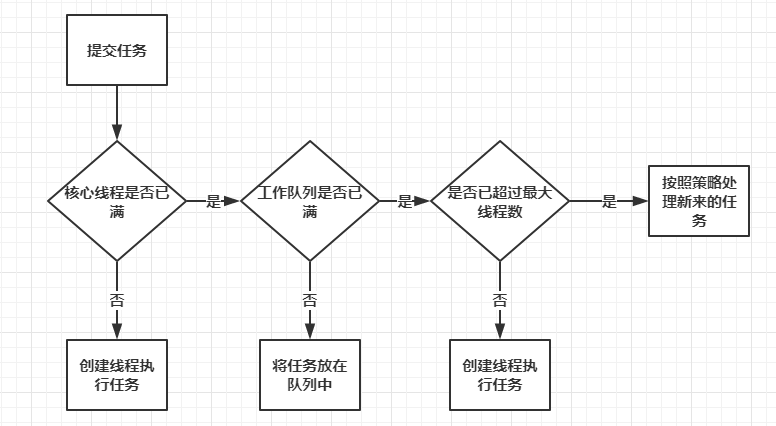
java中的线程池
jdk中提供了线程池的具体实现,实现类是:java.util.concurrent.ThreadPoolExecutor,主要构造方法:
public ThreadPoolExecutor(int corePoolSize,
                              int maximumPoolSize,
                              long keepAliveTime,
                              TimeUnit unit,
                              BlockingQueue<Runnable> workQueue,
                              ThreadFactory threadFactory,
                              RejectedExecutionHandler handler)
- corePoolSize:核心线程大小,当提交一个任务到线程池时,线程池会创建一个线程来执行任务,即使有其他空闲线程可以处理任务也会创新线程,等到工作的线程数大于核心线程数时就不会在创建了。如果调用了线程池的prestartAllCoreThreads方法,线程池会提前把核心线程都创造好,并启动
- maximumPoolSize:线程池允许创建的最大线程数。如果队列满了,并且以创建的线程数小于最大线程数,则线程池会再创建新的线程执行任务。如果我们使用了无界队列,那么所有的任务会加入队列,这个参数就没有什么效果了
- keepAliveTime:线程池的工作线程空闲后,保持存活的时间。如果没有任务处理了,有些线程会空闲,空闲的时间超过了这个值,会被回收掉。如果任务很多,并且每个任务的执行时间比较短,避免线程重复创建和回收,可以调大这个时间,提高线程的利用率
- unit:keepAliveTIme的时间单位,可以选择的单位有天、小时、分钟、毫秒、微妙、千分之一毫秒和纳秒。类型是一个枚举java.util.concurrent.TimeUnit,这个枚举也经常使用
- workQueue:工作队列,用于缓存待处理任务的阻塞队列,常见的有4种
- threadFactory:线程池中创建线程的工厂,可以通过线程工厂给每个创建出来的线程设置更有意义的名字
- handler:饱和策略,当线程池无法处理新来的任务了,那么需要提供一种策略处理提交的新任务,默认有4种策略
线程池的使用
- 调用构造方法创建线程池;
- 调用线程池的方法处理任务;
- 关闭线程池。
/**
 * 线程池基本使用
 */
public class ThreadPoolExecutorDemo {
    static ThreadPoolExecutor threadPoolExecutor = new ThreadPoolExecutor(
            3,//核心线程数
            5,//最大线程数
            1000,//线程空闲时间
            TimeUnit.MILLISECONDS,//时间单位
            new ArrayBlockingQueue<>(10),//阻塞队列
            Executors.defaultThreadFactory(),//线程工厂
            new ThreadPoolExecutor.AbortPolicy()//拒绝策略
    );

    public static void main(String[] args) {
        for (int i = 0; i < 10; i++) {
            int j = i;
            System.out.println("任务" + i);
            String taskName = "任务" + i;
            threadPoolExecutor.execute(() -> {
                //模拟线程任务内部处理耗时
                try {
                    TimeUnit.SECONDS.sleep(j);
                } catch (InterruptedException e) {
                    e.printStackTrace();
                }
                System.out.println(taskName + "-" + Thread.currentThread().getName() + "执行完成");
            });
        }
        //关闭线程池
        threadPoolExecutor.shutdown();
    }
}
//输出:
任务0
任务1
任务2
任务3
任务0-pool-1-thread-1执行完成
任务4
任务5
任务6
任务7
任务8
任务9
任务1-pool-1-thread-2执行完成
任务2-pool-1-thread-3执行完成
任务3-pool-1-thread-1执行完成
任务4-pool-1-thread-2执行完成
任务5-pool-1-thread-3执行完成
任务6-pool-1-thread-1执行完成
任务7-pool-1-thread-2执行完成
任务8-pool-1-thread-3执行完成
任务9-pool-1-thread-1执行完成
线程中常见的5中工作队列
当线程任务大于核心线程数时,会将任务暂存于工作队列中进行处理:
1. **<font style="background-color:rgba(255, 255, 255, 0);">直接提交队列(SynchronousQueue)</font>**
    * **<font style="background-color:rgba(255, 255, 255, 0);">特点</font>**<font style="background-color:rgba(255, 255, 255, 0);">:</font><font style="background-color:rgba(255, 255, 255, 0);">不</font><font style="background-color:rgba(255, 255, 255, 0);">存</font><font style="background-color:rgba(255, 255, 255, 0);">储</font><font style="background-color:rgba(255, 255, 255, 0);">任</font><font style="background-color:rgba(255, 255, 255, 0);">何</font><font style="background-color:rgba(255, 255, 255, 0);">任</font><font style="background-color:rgba(255, 255, 255, 0);">务</font><font style="background-color:rgba(255, 255, 255, 0);">,</font><font style="background-color:rgba(255, 255, 255, 0);">插</font><font style="background-color:rgba(255, 255, 255, 0);">入</font><font style="background-color:rgba(255, 255, 255, 0);">操</font><font style="background-color:rgba(255, 255, 255, 0);">作</font><font style="background-color:rgba(255, 255, 255, 0);">必</font><font style="background-color:rgba(255, 255, 255, 0);">须</font><font style="background-color:rgba(255, 255, 255, 0);">与</font><font style="background-color:rgba(255, 255, 255, 0);">移</font><font style="background-color:rgba(255, 255, 255, 0);">除</font><font style="background-color:rgba(255, 255, 255, 0);">操</font><font style="background-color:rgba(255, 255, 255, 0);">作</font><font style="background-color:rgba(255, 255, 255, 0);">配</font><font style="background-color:rgba(255, 255, 255, 0);">对</font><font style="background-color:rgba(255, 255, 255, 0);">,</font><font style="background-color:rgba(255, 255, 255, 0);">否</font><font style="background-color:rgba(255, 255, 255, 0);">则</font><font style="background-color:rgba(255, 255, 255, 0);">提</font><font style="background-color:rgba(255, 255, 255, 0);">交</font><font style="background-color:rgba(255, 255, 255, 0);">任</font><font style="background-color:rgba(255, 255, 255, 0);">务</font><font style="background-color:rgba(255, 255, 255, 0);">的</font><font style="background-color:rgba(255, 255, 255, 0);">线</font><font style="background-color:rgba(255, 255, 255, 0);">程</font><font style="background-color:rgba(255, 255, 255, 0);">会</font><font style="background-color:rgba(255, 255, 255, 0);">被</font><font style="background-color:rgba(255, 255, 255, 0);">阻</font><font style="background-color:rgba(255, 255, 255, 0);">塞</font><font style="background-color:rgba(255, 255, 255, 0);">。</font>
    * **<font style="background-color:rgba(255, 255, 255, 0);">适用场景</font>**<font style="background-color:rgba(255, 255, 255, 0);">:适用于高吞吐量且任务处理时间短的场景(如实时请求处理)。</font>
    * **<font style="background-color:rgba(255, 255, 255, 0);">注意事项</font>**<font style="background-color:rgba(255, 255, 255, 0);">:需设置较大的 </font>`<font style="background-color:rgba(255, 255, 255, 0);">maximumPoolSize</font>`<font style="background-color:rgba(255, 255, 255, 0);"> 并配合拒绝策略,避免任务被拒绝。</font>
2. **<font style="background-color:rgba(255, 255, 255, 0);">无界队列(LinkedBlockingQueue)</font>**
    * **<font style="background-color:rgba(255, 255, 255, 0);">特点</font>**<font style="background-color:rgba(255, 255, 255, 0);">:</font><font style="background-color:rgba(255, 255, 255, 0);">队</font><font style="background-color:rgba(255, 255, 255, 0);">列</font><font style="background-color:rgba(255, 255, 255, 0);">容</font><font style="background-color:rgba(255, 255, 255, 0);">量</font><font style="background-color:rgba(255, 255, 255, 0);">理</font><font style="background-color:rgba(255, 255, 255, 0);">论</font><font style="background-color:rgba(255, 255, 255, 0);">无</font><font style="background-color:rgba(255, 255, 255, 0);">上</font><font style="background-color:rgba(255, 255, 255, 0);">限</font><font style="background-color:rgba(255, 255, 255, 0);">(</font><font style="background-color:rgba(255, 255, 255, 0);">默</font><font style="background-color:rgba(255, 255, 255, 0);">认</font><font style="background-color:rgba(255, 255, 255, 0);"> </font>`<font style="background-color:rgba(255, 255, 255, 0);">Integer.MAX_VALUE</font>`<font style="background-color:rgba(255, 255, 255, 0);">)</font><font style="background-color:rgba(255, 255, 255, 0);">,</font><font style="background-color:rgba(255, 255, 255, 0);">任</font><font style="background-color:rgba(255, 255, 255, 0);">务</font><font style="background-color:rgba(255, 255, 255, 0);">不</font><font style="background-color:rgba(255, 255, 255, 0);">会</font><font style="background-color:rgba(255, 255, 255, 0);">被</font><font style="background-color:rgba(255, 255, 255, 0);">拒</font><font style="background-color:rgba(255, 255, 255, 0);">绝</font><font style="background-color:rgba(255, 255, 255, 0);">但</font><font style="background-color:rgba(255, 255, 255, 0);">可</font><font style="background-color:rgba(255, 255, 255, 0);">能</font><font style="background-color:rgba(255, 255, 255, 0);">导</font><font style="background-color:rgba(255, 255, 255, 0);">致</font><font style="background-color:rgba(255, 255, 255, 0);">内</font><font style="background-color:rgba(255, 255, 255, 0);">存</font><font style="background-color:rgba(255, 255, 255, 0);">溢</font><font style="background-color:rgba(255, 255, 255, 0);">出</font><font style="background-color:rgba(255, 255, 255, 0);">。</font>
    * **<font style="background-color:rgba(255, 255, 255, 0);">适用场景</font>**<font style="background-color:rgba(255, 255, 255, 0);">:任务处理时间长且生产速度稳定的场景(如批量数据处理),需谨慎监控内存使用。</font>
3. **<font style="background-color:rgba(255, 255, 255, 0);">有界队列(ArrayBlockingQueue 或指定容量的 LinkedBlockingQueue)</font>**
    * **<font style="background-color:rgba(255, 255, 255, 0);">特点</font>**<font style="background-color:rgba(255, 255, 255, 0);">:</font><font style="background-color:rgba(255, 255, 255, 0);">队</font><font style="background-color:rgba(255, 255, 255, 0);">列</font><font style="background-color:rgba(255, 255, 255, 0);">容</font><font style="background-color:rgba(255, 255, 255, 0);">量</font><font style="background-color:rgba(255, 255, 255, 0);">固</font><font style="background-color:rgba(255, 255, 255, 0);">定</font><font style="background-color:rgba(255, 255, 255, 0);">,</font><font style="background-color:rgba(255, 255, 255, 0);">任</font><font style="background-color:rgba(255, 255, 255, 0);">务</font><font style="background-color:rgba(255, 255, 255, 0);">数</font><font style="background-color:rgba(255, 255, 255, 0);">超</font><font style="background-color:rgba(255, 255, 255, 0);">过</font><font style="background-color:rgba(255, 255, 255, 0);">容</font><font style="background-color:rgba(255, 255, 255, 0);">量</font><font style="background-color:rgba(255, 255, 255, 0);">时</font><font style="background-color:rgba(255, 255, 255, 0);">触</font><font style="background-color:rgba(255, 255, 255, 0);">发</font><font style="background-color:rgba(255, 255, 255, 0);">拒</font><font style="background-color:rgba(255, 255, 255, 0);">绝</font><font style="background-color:rgba(255, 255, 255, 0);">策</font><font style="background-color:rgba(255, 255, 255, 0);">略</font><font style="background-color:rgba(255, 255, 255, 0);">。</font>
    * **<font style="background-color:rgba(255, 255, 255, 0);">适用场景</font>**<font style="background-color:rgba(255, 255, 255, 0);">:资源受限场景(如内存敏感型应用),需平衡队列大小与最大线程数。</font>
4. **<font style="background-color:rgba(255, 255, 255, 0);">优先级队列(PriorityBlockingQueue)</font>**
    * **<font style="background-color:rgba(255, 255, 255, 0);">特点</font>**<font style="background-color:rgba(255, 255, 255, 0);">:</font><font style="background-color:rgba(255, 255, 255, 0);">按</font><font style="background-color:rgba(255, 255, 255, 0);">任</font><font style="background-color:rgba(255, 255, 255, 0);">务</font><font style="background-color:rgba(255, 255, 255, 0);">优</font><font style="background-color:rgba(255, 255, 255, 0);">先</font><font style="background-color:rgba(255, 255, 255, 0);">级</font><font style="background-color:rgba(255, 255, 255, 0);">排</font><font style="background-color:rgba(255, 255, 255, 0);">序</font><font style="background-color:rgba(255, 255, 255, 0);">,</font><font style="background-color:rgba(255, 255, 255, 0);">高</font><font style="background-color:rgba(255, 255, 255, 0);">优</font><font style="background-color:rgba(255, 255, 255, 0);">先</font><font style="background-color:rgba(255, 255, 255, 0);">级</font><font style="background-color:rgba(255, 255, 255, 0);">任</font><font style="background-color:rgba(255, 255, 255, 0);">务</font><font style="background-color:rgba(255, 255, 255, 0);">优</font><font style="background-color:rgba(255, 255, 255, 0);">先</font><font style="background-color:rgba(255, 255, 255, 0);">执</font><font style="background-color:rgba(255, 255, 255, 0);">行</font><font style="background-color:rgba(255, 255, 255, 0);">。</font>
    * **<font style="background-color:rgba(255, 255, 255, 0);">适用场景</font>**<font style="background-color:rgba(255, 255, 255, 0);">:需区分任务优先级的场景(如紧急订单处理)。</font>
SynchronousQueue 队列的线程池
/**
 * 线程池SynchronousQueue队列基本使用
 */
public class ThreadPoolExecutorSynchronousQueueDemo1 {

    public static void main(String[] args) {
        ExecutorService threadPool = Executors.newCachedThreadPool();
        for (int i = 0; i < 50; i++) {
            int j = i;
            String taskName = "任务" + i;
            threadPool.execute(() -> {
                System.out.println(Thread.currentThread().getName() + "-->开始执行" + taskName);
                try {
                    Thread.sleep(1000);
                } catch (InterruptedException e) {
                    e.printStackTrace();
                }
            });
        }
        threadPool.shutdown();
    }
}说明:系统创建了50个线程处理任务,代码中使用了SynchronousQueue同步队列,这种队列比较特殊,放入元素必须要有另外一个线程去获取这个元素,否则放入元素会失败或者一直阻塞在那里直到有线程取走,示例中任务处理休眠了指定的时间,导致已创建的工作线程都忙于处理任务,所以新来任务之后,将任务丢入同步队列会失败,丢入队列失败之后,会尝试新建线程处理任务。使用上面的方式创建线程池需要注意,如果需要处理的任务比较耗时,会导致新来的任务都会创建新的线程进行处理,可能会导致创建非常多的线程,最终耗尽系统资源,触发OOM。
PriorityBlockingQueue优先级队列的线程
/**
 * 线程池PriorityBlockingQueue队列基本使用
 */
public class ThreadPoolExecutorPriorityBlockingQueueDemo {
    static class Task implements Runnable, Comparable<Task> {
        private int i;
        private String name;
        public Task(int i, String name) {
            this.i = i;
            this.name = name;
        }
        @Override
        public void run() {
            System.out.println(Thread.currentThread().getName() + "处理" + this.name);
        }
        @Override
        public int compareTo(Task o) {
            return Integer.compare(o.i, this.i);
        }
    }
    public static void main(String[] args) {
        ExecutorService executor = new ThreadPoolExecutor(1, 1,
                60L, TimeUnit.SECONDS,
                new PriorityBlockingQueue());
        for (int i = 0; i < 10; i++) {
            String taskName = "任务" + i;
            executor.execute(new Task(i, taskName));
        }
        for (int i = 100; i >= 90; i--) {
            String taskName = "任务" + i;
            executor.execute(new Task(i, taskName));
        }
        executor.shutdown();
    }
}

//输出:
pool-1-thread-1处理任务0
pool-1-thread-1处理任务100
pool-1-thread-1处理任务99
pool-1-thread-1处理任务98
pool-1-thread-1处理任务97
pool-1-thread-1处理任务96
pool-1-thread-1处理任务95
pool-1-thread-1处理任务94
pool-1-thread-1处理任务93
pool-1-thread-1处理任务92
pool-1-thread-1处理任务91
pool-1-thread-1处理任务90
pool-1-thread-1处理任务9
pool-1-thread-1处理任务8
pool-1-thread-1处理任务7
pool-1-thread-1处理任务6
pool-1-thread-1处理任务5
pool-1-thread-1处理任务4
pool-1-thread-1处理任务3
pool-1-thread-1处理任务2
pool-1-thread-1处理任务1说明:输出中,除了第一个任务,其他任务按照优先级高低按顺序处理。原因在于:创建线程池的时候使用了优先级队列,进入队列中的任务会进行排序,任务的先后顺序由Task中的i变量决定。向PriorityBlockingQueue加入元素的时候,内部会调用代码中Task的compareTo方法决定元素的先后顺序。
自定义线程工厂
给线程池中线程起一个有意义的名字,在系统出现问题的时候,通过线程堆栈信息可以更容易发现系统中问题所在。自定义创建工厂需要实现java.util.concurrent.ThreadFactory接口中的Thread newThread(Runnable r)方法,参数为传入的任务,需要返回一个工作线程。
/**
 * 线程池自定义工厂
 */
public class ThreadPoolExecutorCustomizeDemo {
    static AtomicInteger threadNum = new AtomicInteger(1);

    public static void main(String[] args) {
        ThreadPoolExecutor threadPoolExecutor = new ThreadPoolExecutor(
                5,
                5,
                60L,
                TimeUnit.SECONDS,
                new ArrayBlockingQueue<Runnable>(10),
                r -> {
                    Thread thread = new Thread(r);
                    thread.setName("自定义线程-" + threadNum.getAndIncrement());
                    return thread;
                });
        for (int i = 0; i < 5; i++) {
            String takName = "任务-" + i;
            threadPoolExecutor.execute(() -> {
                System.out.println(Thread.currentThread().getName() + "-执行完成" + takName);
            });
        }
        threadPoolExecutor.shutdown();
    }
}
//输出:
自定义线程-1-执行完成任务-0
自定义线程-4-执行完成任务-3
自定义线程-2-执行完成任务-1
自定义线程-5-执行完成任务-4
自定义线程-3-执行完成任务-2
常见饱和策略(拒绝策略)
触发条件
- 当线程池中,线程数已达最大线程数,所以线程均处理运行状态会触发拒绝策略;
- 任务队列已满,无法容纳新任务。此时新提交的任务会被拒绝,并根据预设的拒绝策略处理。
线程池内置的拒绝策略
Java线程池提供了四种默认拒绝策略,均实现自RejectedExecutionHandler接口:
| 策略 | 行为 | 适用场景 |
|---|---|---|
| AbortPolicy | 直接抛出<font style="background-color:rgba(255, 255, 255, 0);">RejectedExecutionException</font>异常,阻止任务提交。默认策略。 | 需严格保证任务不丢失的场景(如支付交易系统),需显式捕获异常处理 |
| CallerRunsPolicy | 由提交任务的线程(如主线程)直接执行被拒绝的任务,降低任务提交速率。 | 流量突增时缓冲压力(如日志记录),避免线程池过载 |
| DiscardPolicy | 静默丢弃被拒绝的任务,无任何通知。 | 允许部分任务丢失的非核心场景(如缓存更新) |
| DiscardOldestPolicy | 丢弃队列中最旧的任务(队列头部任务),并重新尝试提交当前任务。 | 需优先处理最新任务的场景(如实时数据采集),但可能导致旧任务丢失 |
/**
 * 线程的拒绝策略
 */
public class ThreadPoolAbortPolicyDemo {
    public static void main(String[] args) {
        ExecutorService executor = new ThreadPoolExecutor(2, 3,
                60L, TimeUnit.SECONDS,
                new LinkedBlockingQueue<>(5),
                new ThreadPoolExecutor.AbortPolicy());

        for (int i = 0; i < 10; i++) {
            int j = i;
            try {
                executor.execute(() -> {
                    try {
                        TimeUnit.SECONDS.sleep(10);
                        System.out.println(Thread.currentThread().getName() + "开始执行任务"+j);
                    } catch (InterruptedException e) {
                        e.printStackTrace();
                    }
                });
            } catch (RejectedExecutionException e) {
                System.out.println("任务"+j+"被拒绝!");
            }
        }
        executor.shutdown();
    }
}
//输出:
任务9被拒绝!
pool-1-thread-2开始执行任务1
pool-1-thread-1开始执行任务0
pool-1-thread-3开始执行任务7
pool-1-thread-2开始执行任务3
pool-1-thread-3开始执行任务4
pool-1-thread-1开始执行任务2
pool-1-thread-2开始执行任务5
pool-1-thread-3开始执行任务6
自定义饱和策略
需要实现RejectedExecutionHandler接口。任务无法处理的时候,我们想记录一下日志,我们需要自定义一个饱和策略,示例代码:
/**
 * 线程的自定义策略
 */
public class ThreadPoolCustomizeDemo {
    static class MyRejectedExecutionHandler implements RejectedExecutionHandler{
        @Override
        public void rejectedExecution(Runnable r, ThreadPoolExecutor executor) {
            //记录一下无法处理的任务
            System.out.println("无法处理的任务:" + r.toString());
        }
    }

    static class Task implements Runnable {
        String name;

        public Task(String name) {
            this.name = name;
        }


        @Override
        public void run() {
            System.out.println(Thread.currentThread().getName() + "处理了" + this.name);
            try {
                TimeUnit.SECONDS.sleep(5);
            } catch (InterruptedException e) {
                e.printStackTrace();
            }
        }

        @Override
        public String toString() {
            return "Task{" +
                    "name='" + name + '\'' +
                    '}';
        }
    }

    public static void main(String[] args) {
        ThreadPoolExecutor executor = new ThreadPoolExecutor(1, 1,
                60L, TimeUnit.SECONDS,
                new ArrayBlockingQueue<>(1),
                Executors.defaultThreadFactory(),
                new MyRejectedExecutionHandler());
        for (int i = 0; i < 5; i++) {
            executor.execute(new Task("任务" + i));
        }
        executor.shutdown();
    }
}

//输出:
无法处理的任务:Task{name='任务2'}
pool-1-thread-1处理了任务0
无法处理的任务:Task{name='任务3'}
无法处理的任务:Task{name='任务4'}
pool-1-thread-1处理了任务1
关闭线程池的方法
**<font style="background-color:rgba(255, 255, 255, 0);">shutdown()</font>**- 行为:
- 将线程池状态设为
<font style="background-color:rgba(255, 255, 255, 0);">SHUTDOWN</font>,拒绝新任务提交。 - 已提交的任务(包括队列中的任务)会继续执行,但正在执行的任务不会被中断。
- 线程池在所有任务完成后才会终止。
- 将线程池状态设为
- 适用场景:需确保所有任务完整执行的场景(如数据持久化、日志处理)。
- 行为:
**<font style="background-color:rgba(255, 255, 255, 0);">shutdownNow()</font>**- 行为:
- 将线程池状态设为
<font style="background-color:rgba(255, 255, 255, 0);">STOP</font>,拒绝新任务提交。 - 清空队列中的未执行任务,并尝试通过
<font style="background-color:rgba(255, 255, 255, 0);">Thread.interrupt()</font>中断正在执行的任务(若任务未响应中断,则无法终止)。 - 返回未执行的任务列表。
- 将线程池状态设为
- 适用场景:需立即停止任务的场景(如资源紧急回收、任务优先级调整)。
- 行为:
**<font style="background-color:rgba(255, 255, 255, 0);">awaitTermination(long timeout, TimeUnit unit)</font>**- 行为:
- 阻塞当前线程,等待线程池关闭或超时。
- 需与
<font style="background-color:rgba(255, 255, 255, 0);">shutdown()</font>或<font style="background-color:rgba(255, 255, 255, 0);">shutdownNow()</font>配合使用,用于同步等待任务结束。
- 适用场景:需限制关闭等待时间的场景(如服务停机发布)。
- 行为:
Executor框架
简化线程池创建的核心工具类,通过工厂方法提供预配置的线程池,帮助开发者高效管理多线程任务。核心目的是解耦任务提交和执行逻辑,避免手动管理线程生命周期,提高资源利用率。
Executor接口
<font style="color:rgb(51, 51, 51);">Executor</font>接口中定义了方法<font style="color:rgb(51, 51, 51);">execute(Runable able)</font>接口,该方法接受一个<font style="color:rgb(51, 51, 51);">Runable</font>实例,他来执行一个任务,任务即实现一个<font style="color:rgb(51, 51, 51);">Runable</font>接口的类。
ExecutorService接口
继承了<font style="color:rgb(51, 51, 51);">Executor</font>接口,提供了关闭自己的方法,以及为跟踪一个或多个异步任务执行状况而生成<font style="color:rgb(51, 51, 51);">Future</font>的方法。
<font style="color:rgb(51, 51, 51);">ExecutorService</font>有三种状态:运行、关闭、终止。创建后便进入运行状态,当调用了<font style="color:rgb(51, 51, 51);">shutdown()</font>方法时,便进入了关闭状态,此时意味着ExecutorService不再接受新的任务,但是他还是会执行已经提交的任务,当所有已经提交了的任务执行完后,便达到终止状态。如果不调用<font style="color:rgb(51, 51, 51);">shutdown</font>方法,<font style="color:rgb(51, 51, 51);">ExecutorService</font>方法会一直运行下去,系统一般不会主动关闭。
ThreadPoolExecutor类
线程池类,实现了<font style="color:rgb(51, 51, 51);background-color:rgb(246, 246, 246);">ExecutorService</font>接口中所有方法。
ScheduledThreadPoolExecutor定时器
<font style="color:rgb(51, 51, 51);">ScheduledThreadPoolExecutor</font>继承自<font style="color:rgb(51, 51, 51);">ThreadPoolExecutor</font>,他主要用来延迟执行任务,或者定时执行任务。功能和<font style="color:rgb(51, 51, 51);">Timer</font>类似,但是<font style="color:rgb(51, 51, 51);">ScheduledThreadPoolExecutor</font>更强大、更灵活一些。<font style="color:rgb(51, 51, 51);">Timer</font>后台是单个线程,而<font style="color:rgb(51, 51, 51);">ScheduledThreadPoolExecutor</font>可以在创建的时候指定多个线程。
常用方法:
schedule:延迟执行任务1次
public ScheduledFuture<?> schedule(Runnable command, long delay, TimeUnit unit)
/**
* command:需要执行的任务
* delay:需要延迟的时间
* unit:参数2的时间单位,是个枚举,可以是天、小时、分钟、秒、毫秒、纳秒等
*/
scheduleAtFixedRate:固定的频率执行任务
该方法设置了执行周期,下一次执行时间相当于是上一次的执行时间加上<font style="color:rgb(51, 51, 51);">period</font>,任务每次执行完毕之后才会计算下次的执行时间。
    /**
    * command:要执行的任务;
    * initialDelay:表示延迟多久执行第一次;
    * period:连续执行之间的时间间隔;
    * unit:时间单位(枚举)
    */
    public ScheduledFuture<?> scheduleAtFixedRate(Runnable command,
                                                  long initialDelay,
                                                  long period,
TimeUnit unit);假设系统调用<font style="color:rgb(51, 51, 51);">scheduleAtFixedRate</font>的时间是T1,那么执行时间如下:
第1次:T1+initialDelay
第2次:T1+initialDelay+period
第3次:T1+initialDelay+2*period
第n次:T1+initialDelay+(n-1)*period
scheduleWithFixedDelay:固定的间隔执行任务
该方法设置了执行周期,与<font style="color:rgb(51, 51, 51);">scheduleAtFixedRate</font>方法不同的是,下一次执行时间是上一次任务执行完的系统时间加上<font style="color:rgb(51, 51, 51);">period</font>,因而具体执行时间不是固定的,但周期是固定的,是采用相对固定的延迟来执行任务。
    public ScheduledFuture<?> scheduleWithFixedDelay(Runnable command, //表示要执行的任务
                                                     long initialDelay, //表示延迟多久执行第一次
                                                     long delay,// 表示下次执行时间和上次执行结束时间之间的间隔时间
                                                     TimeUnit unit); // 时间单位
假设系统调用scheduleAtFixedRate的时间是T1,那么执行时间如下:
第1次:T1+initialDelay,执行结束时间:E1
第2次:E1+period,执行结束时间:E2
第3次:E2+period,执行结束时间:E3
第4次:E3+period,执行结束时间:E4
第n次:上次执行结束时间+period
/**
 * ScheduledThreadPoolExecutor定时器
 */
public class ExecutorScheduleDemo {
    public static void main(String[] args) {
        System.out.println("main start..." + DateUtil.now());
        ScheduledExecutorService pool = Executors.newScheduledThreadPool(10);
        //schedule 延迟一次执行
        pool.schedule(() -> {
            System.out.println("schedule start..." + DateUtil.now());
            //模拟任务耗时
            try {
                TimeUnit.SECONDS.sleep(3);
            } catch (InterruptedException e) {
                e.printStackTrace();
            }
            System.out.println("schedule end..." + DateUtil.now());
        }, 2, TimeUnit.SECONDS);
        pool.shutdown();


        //任务执行计数器
        AtomicInteger count = new AtomicInteger(1);
        //固定延迟频率执行
        pool = Executors.newScheduledThreadPool(10);
        pool.scheduleAtFixedRate(() -> {
            int countAndIncrement = count.getAndIncrement();
            System.out.println(countAndIncrement+"scheduleAtFixedRate start..." + DateUtil.now());
            try {
                TimeUnit.SECONDS.sleep(1);
            } catch (InterruptedException e) {
                e.printStackTrace();
            }
            System.out.println(countAndIncrement+"scheduleAtFixedRate end..." + DateUtil.now());
        },1,1, TimeUnit.SECONDS);
        pool.shutdown();

        //固定间隔任务
        //任务执行计数器
        AtomicInteger count2 = new AtomicInteger(1);
        //固定延迟频率执行
        pool = Executors.newScheduledThreadPool(10);
        pool.scheduleWithFixedDelay(() -> {
            int countAndIncrement = count2.getAndIncrement();
            System.out.println(countAndIncrement+"scheduleWithFixedDelay start..." + DateUtil.now());
            try {
                TimeUnit.SECONDS.sleep(1);
            } catch (InterruptedException e) {
                e.printStackTrace();
            }
            System.out.println(countAndIncrement+"scheduleWithFixedDelay end..." + DateUtil.now());
        },1,3, TimeUnit.SECONDS);
    }
}
补充
<font style="color:rgb(51, 51, 51);">schedule、scheduleAtFixedRate、scheduleWithFixedDelay</font>这几个方法有个返回值<font style="color:rgb(51, 51, 51);">ScheduledFuture</font>,通过<font style="color:rgb(51, 51, 51);background-color:rgb(246, 246, 246);">ScheduledFuture</font>可以对执行的任务做一些操作,如判断任务是否被取消、是否执行完成。
异常处理
/**
 * 异常处理
 */
public class ExecutorScheduleExceptionDemo {
    public static void main(String[] args) throws InterruptedException {
        System.out.println("main start..." + DateUtil.now());
        AtomicInteger count = new AtomicInteger(1);
        ScheduledExecutorService pool = Executors.newScheduledThreadPool(10);
        ScheduledFuture<?> scheduledFuture = pool.scheduleWithFixedDelay(() -> {
            int countAndIncrement = count.getAndIncrement();
            System.out.println(countAndIncrement + "scheduleWithFixedDelay start..." + DateUtil.now());
            System.out.println(1 / 0);
            System.out.println(countAndIncrement + "scheduleWithFixedDelay end..." + DateUtil.now());
        }, 1, 1, TimeUnit.SECONDS);

        TimeUnit.SECONDS.sleep(5);

        System.out.println(scheduledFuture.isCancelled());
        System.out.println(scheduledFuture.isDone());
    }
}

//输出:
main start...2025-04-21 21:55:33
1scheduleWithFixedDelay start...2025-04-21 21:55:34
false
true
任务中有个10/0的操作,会触发异常,发生异常之后没有任何现象,被`ScheduledExecutorService`内部给吞掉了,然后这个任务再也不会执行了,`scheduledFuture.isDone()`输出`true`,表示这个任务已经结束了,再也不会被执行了。所以如果程序有异常,开发者自己注意处理一下,不然跑着跑着发现任务怎么不跑了,也没有异常输出。
取消定时任务的执行
调用<font style="color:rgb(51, 51, 51);background-color:rgb(246, 246, 246);">ScheduledFuture</font>的<font style="color:rgb(51, 51, 51);background-color:rgb(246, 246, 246);">cancel</font>方法,参数表示是否给任务发送中断信号。
/**
 * 取消执行
 */
public class ExecutorScheduleExceptionDemo {
    public static void main(String[] args) throws InterruptedException {
        System.out.println("main start..." + DateUtil.now());
        ScheduledExecutorService pool = Executors.newScheduledThreadPool(10);
        //去掉定时任务
        pool.shutdown();
        pool = Executors.newScheduledThreadPool(10);
        ScheduledFuture<?> schedule = pool.schedule(() -> {
            System.out.println("schedule start..." + DateUtil.now());
            try {
                TimeUnit.SECONDS.sleep(3);
            } catch (InterruptedException e) {
                e.printStackTrace();
            }
            System.out.println("schedule end..." + DateUtil.now());
        }, 2, TimeUnit.SECONDS);

        TimeUnit.SECONDS.sleep(5);

        schedule.cancel(true);
        System.out.println("任务是否被取消:"+schedule.isCancelled());
        System.out.println("任务是否执行完成:"+schedule.isDone());
    }
}

//输出:
schedule start...2025-04-21 22:01:15
任务是否被取消:true
任务是否执行完成:true
schedule end...2025-04-21 22:01:18
boolean isCancelled();//如果此任务在正常完成之前被取消,则返回 true 此任务
boolean isDone();//如果此任务已完成,则返回 true 。完成可能是由于正常终止、异常或取消 —— 在所有这些情况下,此方法都将返回 true